Quick links
TL;DR (Quick Answer)
Email bounces usually happen because the address is invalid, the recipient server rejected the message, or the inbox/server had a temporary issue. Hard bounces should usually be removed from your list immediately, while soft bounces can often be fixed by lowering sending volume, cleaning your list, reducing email size, or checking your authentication settings. Understanding SMTP error codes makes it much easier to diagnose what actually went wrong.
Bounced emails are a normal part of email sending, but high bounce rates usually signal deeper deliverability problems.
A single bounced email might come from a temporary server issue or a full inbox. Larger patterns often point to outdated contact lists, poor sender reputation, authentication problems, or aggressive sending practices.
The problem is that bounce messages are rarely written in plain language. Most email providers return SMTP error codes and technical responses that can be difficult to interpret without deliverability experience.
Knowing what those errors mean makes it much easier to identify delivery problems, clean your lists properly, and prevent future campaigns from losing inbox placement.
Key takeaways
- Soft bounces are temporary delivery failures, while hard bounces are permanent
- SMTP error codes explain why an email was rejected
- High bounce rates can damage sender reputation and inbox placement
- Invalid email addresses and blocked senders are common causes of hard bounces
- Temporary server issues, greylisting, and rate limiting often cause soft bounces
- Regular list cleaning and email validation help reduce bounce rates
What is a bounced email?
A bounced email is an email that was rejected by the recipient’s mail server before delivery.
Instead of reaching the inbox, the message is returned to the sender with an SMTP response code explaining why the delivery failed.
These responses can range from temporary server problems to permanent delivery failures caused by invalid email addresses or blocked senders.
| Bounce type | Temporary? | Retry recommended? | Remove from list? |
| Soft bounce | Yes | Usually automatic | Not immediately |
| Hard bounce | No | No | Usually yes |
Why bounce rates matter for email deliverability
Bounce rates are one of the signals mailbox providers use to evaluate sender quality.
If too many emails fail to deliver, providers may assume your lists are outdated, poorly maintained, or potentially spam-related.
That can reduce inbox placement and make future campaigns more likely to land in spam folders.
Hard bounces are especially important because they often indicate invalid or nonexistent email addresses. Continuing to send to those addresses can damage sender reputation over time.
High bounce rates can also lead to:
- Lower inbox placement
- Domain reputation issues
- ESP warnings or account restrictions
- Lower campaign performance
- Higher likelihood of spam filtering
Most email platforms automatically suppress hard bounced addresses, but regularly cleaning and validating your email lists is still important for maintaining healthy deliverability.
Decoding SMTP error codes
When an email bounces, the recipient mail server usually returns an SMTP status code explaining why delivery failed.
These codes help identify whether the issue is temporary, permanent, related to sender reputation, authentication, server availability, or something else entirely.
The first number is usually the most important:
- 4xx errors: Temporary delivery failures
- 5xx errors: Permanent delivery failures
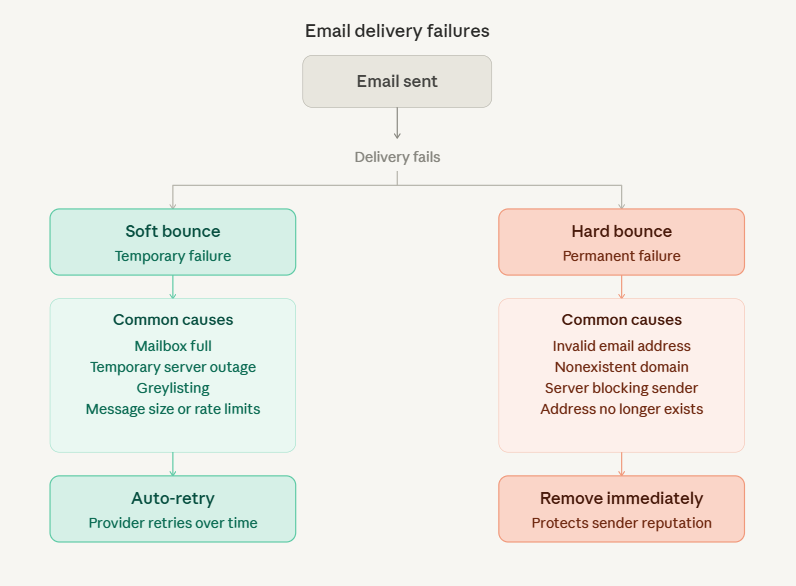
400-level errors (transient failures)
400-level errors usually mean the message could not be delivered right now, but the issue may resolve automatically later.
These errors are commonly caused by:
- Temporary mail server outages
- Mailbox storage limits
- Greylisting
- Rate limiting
- Connection problems
Most email providers retry soft bounced emails automatically for a period of time before stopping delivery attempts.
500-level errors (permanent failures)
500-level errors usually indicate permanent delivery failures that require action from the sender.
These errors are commonly linked to:
- Invalid email addresses
- Nonexistent domains
- Authentication failures
- Sender reputation problems
- Spam filtering policies
Hard bounce errors should be reviewed carefully because repeatedly sending to invalid or rejected addresses can hurt sender reputation over time.
SMTP bounce code cheat sheet
| SMTP code | Meaning | Bounce type | Typical cause | Recommended action |
| 421 | Service unavailable | Soft bounce | Recipient mail server temporarily offline | Retry later |
| 450 | Mailbox unavailable | Soft bounce | Busy mailbox or greylisting | Retry automatically |
| 451 | Local server error | Soft bounce | Temporary processing issue | Retry later |
| 452 | Insufficient storage | Soft bounce | Mailbox full | Retry later |
| 500 | General server error | Hard bounce | Invalid SMTP command or server issue | Review server configuration |
| 501 | Syntax error in parameters | Hard bounce | Invalid email formatting | Verify email syntax |
| 502 | Command not implemented | Hard bounce | Unsupported mail server command | Review sending configuration |
| 503 | Bad command sequence | Hard bounce | Incorrect SMTP sequence | Review mail server setup |
| 504 | Command parameter not implemented | Hard bounce | Unsupported parameter | Check SMTP compatibility |
| 521 | Domain does not accept mail | Hard bounce | Recipient server rejects all mail | Remove address or domain |
| 530 | Authentication required | Hard bounce | Missing SMTP authentication | Configure SMTP authentication |
| 535 | Authentication failed | Hard bounce | Incorrect SMTP credentials | Verify login credentials |
| 541 | Message rejected | Hard bounce | Policy or spam rejection | Review sender reputation |
| 550 | Mailbox unavailable | Hard bounce | Invalid mailbox or blocked sender | Remove invalid addresses and review reputation |
| 551 | User not local | Hard bounce | Routing or forwarding issue | Verify recipient address |
| 552 | Storage exceeded | Hard bounce | Mailbox quota exceeded | Retry carefully or contact recipient |
| 553 | Invalid recipient address | Hard bounce | Invalid or malformed email address | Remove from list |
| 554 | Transaction failed | Hard bounce | Spam filtering or policy rejection | Review authentication and sender reputation |
5 common reasons for soft bounces (and how to fix them)
Soft bounces are temporary delivery failures. In many cases, the email may still be delivered later after the recipient server retries the message.
Here are some of the most common causes.
Mailbox full
If the recipient’s inbox has reached its storage limit, the server may temporarily reject incoming mail.
This usually resolves once the recipient deletes messages or frees up storage space. Most email providers will retry delivery automatically for a period of time.
Message too large
Large attachments, oversized images, or heavy HTML emails can trigger message size limits on recipient servers.
Compressing images, reducing attachment sizes, and avoiding unnecessarily large email designs can help reduce these bounces.
Temporary server outage
Recipient mail servers occasionally experience downtime, maintenance periods, or temporary processing issues.
These bounces are usually short-term and often resolve without requiring any action from the sender.
Greylisting
Greylisting is an anti-spam technique where the recipient server temporarily rejects emails from unknown senders on the first delivery attempt.
Legitimate mail servers usually retry automatically, while many spam systems do not. This means the email may still be delivered successfully after a short delay.
Rate limiting
Some mailbox providers temporarily reject emails when senders exceed volume thresholds too quickly.
This often happens during large campaigns, sudden sending spikes, or poorly warmed-up sending domains.
Gradually increasing sending volume and throttling campaigns can help reduce rate-limit related bounces.
3 common reasons for hard bounces (and how to tackle them)
Hard bounces indicate permanent delivery failures. Unlike soft bounces, these emails are unlikely to succeed even after retry attempts.
Repeatedly sending to hard bounced addresses can damage sender reputation and decrease deliverability over time.
Invalid email address
One of the most common hard bounce causes is sending to an email address that does not exist.
This can happen because of:
- Typos
- Fake signups
- Outdated contact lists
- Data entry mistakes
Invalid addresses should usually be removed from your list immediately.
Domain does not exist
Sometimes the recipient domain itself is no longer active or was entered incorrectly.
For example:
- [email protected]
- Expired company domains
- Misspelled domains
These addresses can’t receive email and will continue bouncing permanently until removed.
Sender blocked by recipient server
Recipient servers may block senders because of:
- Poor sender reputation
- Spam complaints
- Missing SPF, DKIM, or DMARC records
- Blacklist issues
- Suspicious sending behavior
Unlike invalid addresses, these hard bounces usually require fixing deliverability or authentication problems rather than simply removing contacts from your list.
How to reduce your bounce rate
Lower bounce rates usually come down to better list hygiene and healthier sending practices.
A few small improvements can significantly reduce delivery failures over time.
Validate email addresses before sending
Email validation helps identify:
- Invalid addresses
- Misspelled domains
- Disposable emails
- Nonexistent mailboxes
Cleaning lists before campaigns decreases the likelihood of hard bounces and protects sender reputation.
Remove inactive or repeatedly bouncing contacts
Keeping old or unengaged addresses on your list increases the chance of delivery failures over time.
Most email platforms automatically suppress hard bounced addresses, but regular list cleaning is still important for maintaining healthy deliverability.
Verify your email lists with EmailListVerify before sending campaigns to reduce hard bounces and protect your sender reputation.
Avoid purchased email lists
Purchased or scraped email lists often contain outdated, invalid, or low-quality addresses.
These lists typically generate much higher bounce rates and spam complaints than permission-based subscriber lists.
Read our guide on purchased email lists to learn why they increase bounce rates, spam complaints, and deliverability problems.
Warm up new sending domains
Sending large campaign volumes from a new domain too quickly can trigger rate limiting and spam filtering.
Gradually increasing sending volume helps mailbox providers build trust in your domain and sending behavior.
Warm up new domains with a tool like Warmup Inbox to build sender reputation gradually and avoid rate limiting or spam filtering issues.
Set up SPF, DKIM, and DMARC
Email authentication records help recipient servers verify that your emails are legitimate.
Missing or incorrect authentication increases the likelihood of rejection, spam filtering, and deliverability problems.
Take advantage of our free SPF record generator and DMARC record generator to improve email authentication and reduce deliverability issues caused by missing or incorrect DNS records.
When should you remove an email address from your list?
Hard bounced addresses should usually be removed quickly, especially when the mailbox or domain does not exist. Continuing to send to invalid addresses can damage sender reputation and increase spam filtering risks.
Soft bounces are different because many are temporary. A mailbox may be full today but active again next week.
A common approach is:
- Remove hard bounced addresses immediately
- Retry soft bounces automatically for a limited period
- Suppress addresses that continue soft bouncing repeatedly over time
It is also worth reviewing addresses that:
- Never engage with campaigns
- Frequently soft bounce
- Trigger repeated delivery warnings
- Come from suspicious or low-quality signup sources
Next steps
Bounced emails are impossible to avoid entirely, but consistently high bounce rates usually point to deeper list quality or deliverability problems.
Understanding SMTP error codes, separating soft bounces from hard bounces, and cleaning invalid addresses regularly can help protect sender reputation and improve inbox placement over time.
If your bounce rates are increasing, one of the fastest ways to improve deliverability is validating and cleaning your email lists with EmailListVerify before sending campaigns.
FAQs
What is a good email bounce rate?
Most email marketers aim to keep bounce rates below 2%. High hard bounce rates can negatively affect sender reputation and inbox placement.
Can soft bounces become hard bounces?
Yes. A temporary issue can eventually become a permanent one if the mailbox remains inactive, the domain expires, or repeated delivery attempts continue failing.
Do bounced emails hurt sender reputation?
Yes. High bounce rates, especially hard bounces, can signal poor list hygiene or risky sending behavior to mailbox providers.
Should I retry bounced emails?
Soft bounces are often retried automatically by email providers. Hard bounced addresses usually should not be retried unless the underlying issue has been resolved.
Why are valid email addresses bouncing?
Valid addresses can still bounce because of server outages, greylisting, rate limiting, spam filtering, or authentication problems.
What does “550 mailbox unavailable” mean?
A 550 error usually means the mailbox does not exist or the recipient server rejected the message. It is one of the most common hard bounce errors.
What is the difference between a bounced email and a blocked email?
A bounced email is rejected during delivery. A blocked email is typically refused because of spam filtering, sender reputation problems, or server policies.
Join Our Monthly Newsletter
Learn how to improve email deliverability and clean your email lists with and more.