Quick links
TL;DR (Quick Answer)
Invalid email addresses usually come from formatting mistakes, nonexistent domains, fake signups, or inactive mailboxes. In B2B email marketing, valid addresses also become invalid constantly because people change jobs or companies. Left unchecked, invalid emails lead to hard bounces, lower inbox placement, and sender reputation problems. Using double opt-in, form validation, and real-time email verification helps stop bad addresses before they enter your CRM.
Invalid email addresses are one of the most common causes of hard bounces and deliverability problems.
Some are caused by simple typos during signup, while others come from fake submissions, outdated contact databases, or email accounts that no longer exist. In B2B marketing especially, email decay happens constantly as employees leave companies or switch roles.
The problem is that repeatedly sending emails to invalid addresses does more than waste campaigns. High bounce rates can damage sender reputation, reduce inbox placement, and increase spam filtering over time.
The good news is that most invalid emails can be prevented before they ever enter your CRM.
Key takeaways
- Invalid emails usually fall into three categories: syntax errors, domain errors, and mailbox errors
- B2B email lists naturally decay over time because of employee turnover
- High numbers of invalid addresses increase hard bounce rates and hurt deliverability
- Double opt-in helps prevent fake or mistyped signups
- Front-end form validation catches obvious formatting mistakes
- Real-time email verification helps stop invalid addresses before they enter your database
What makes an email address “invalid”?
An email address is considered invalid when it can’t successfully receive messages.
This usually happens because of formatting problems, nonexistent domains, or mailboxes that no longer exist.
Syntax errors
Syntax errors happen when the email address is formatted incorrectly.
Common examples include:
- Missing the @ symbol
- Missing the domain extension
- Extra spaces or invalid characters
- Typos like john@company,com
These addresses fail basic formatting checks and can’t receive mail.
Domain errors
Domain errors happen when the domain itself does not exist or cannot accept email.
Examples include:
- Misspelled domains like gmial.com
- Expired company domains
- Fake domains entered on signup forms
Even if the email format looks correct, messages can’t be delivered if the domain is invalid.
Mailbox errors
Mailbox errors happen when the domain exists, but the specific inbox does not.
For example:
- The employee left the company
- The address was deleted
- The user never existed in the first place
This is one of the most common causes of hard bounces in B2B email marketing.
The lifecycle of a B2B email address
A valid email address today may become invalid six months from now.
This happens constantly in B2B databases because employees change jobs, switch departments, leave companies, or abandon old inboxes.
For example:
- [email protected] may work perfectly during signup
- Sarah leaves the company
- The mailbox is deleted
- Future campaigns start hard bouncing
This process is often called email list decay.
B2B lists usually decay faster than many marketers expect, especially in industries with high turnover or rapidly growing teams. Some research estimates that B2B contact data decays by roughly 22-30% per year as employees change jobs, companies rebrand, and old inboxes are abandoned.
That is why list validation is not a one-time task. It needs to happen continuously as contacts age and company data changes.
The ripple effect of emailing invalid addresses
Invalid email addresses do more than create a few bounced messages.
Mailbox providers use bounce rates as a signal when evaluating sender quality. If too many emails fail to deliver, your domain and IP reputation can start to decline.
The process usually looks something like this:
Hard bounces increase → mailbox providers notice repeated delivery failures → sender reputation weakens → more emails land in spam
Over time, this can lead to:
- Lower inbox placement
- Higher spam filtering rates
- Reduced engagement
- ESP warnings or sending restrictions
- Poorer campaign performance overall
Hard bounces are especially damaging because they often indicate outdated or low-quality lists. Continuing to send to invalid addresses tells mailbox providers that your data hygiene may be poor.
Even legitimate senders can run into deliverability problems if invalid addresses accumulate over time.
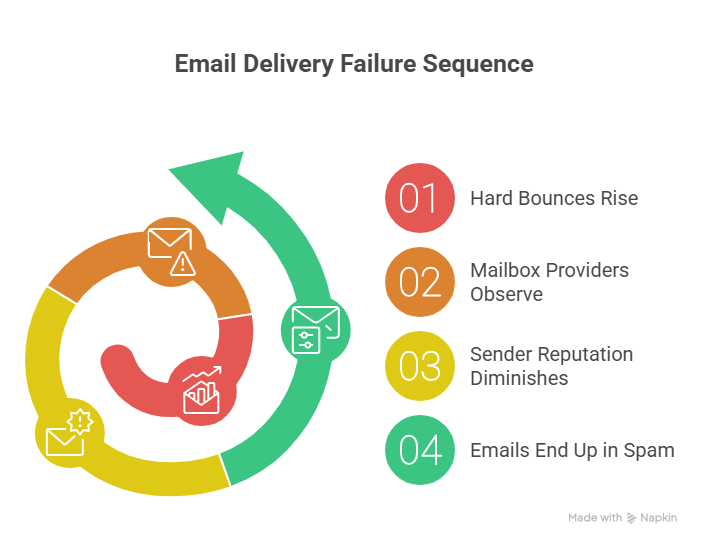
Email failure delivery sequence
How to stop invalid emails before they enter your CRM
Preventing invalid email addresses is much easier than cleaning up deliverability problems later.
A few simple checks during signup can greatly reduce hard bounces and improve long-term list quality.
Implement double opt-in
Double opt-in requires users to confirm their email address before joining your list.
After signup, the user receives a confirmation email with a verification link. The address is only added to the mailing list after the link is clicked.
This prevents:
- Fake signups
- Mistyped email addresses
- Bot submissions
- Low-quality leads
While double opt-in may slow list growth slightly, it usually improves list quality, engagement, and deliverability over time.
| Factor | Single opt-in | Double opt-in |
| List growth speed | Faster | Slower |
| List quality | Lower | Higher |
| Invalid email risk | Higher | Lower |
| Spam complaint risk | Higher | Lower |
| Engagement rates | Lower | Higher |
Basic front-end validation (Regex)
Basic form validation can catch obvious formatting mistakes before a user submits a signup form.
For example, a simple regex check can verify that the address contains:
- An @ symbol
- A valid domain
- A domain extension like .com
Example:
^[^\s@]+@[^\s@]+\.[^\s@]+$
This type of validation will not confirm that the mailbox actually exists, but it can reduce simple syntax errors and typos.
Real-time API verification
Real-time email verification checks whether an address is deliverable before it enters your CRM.
These systems can detect:
- Invalid domains
- Nonexistent mailboxes
- Disposable email addresses
- Temporary inboxes
- High-risk or catch-all addresses
This helps stop low-quality contacts before they affect bounce rates or sender reputation later.
Verify email addresses before importing or sending to new contact lists to reduce hard bounces and improve deliverability.
Next steps
Invalid email addresses are impossible to avoid completely, especially in fast-changing B2B databases. But high bounce rates are usually preventable with better signup validation and regular list maintenance.
Catching invalid emails early helps protect sender reputation, improve inbox placement, and reduce wasted sends over time.
If your lists are generating too many hard bounces, start by validating old contacts, removing inactive addresses, and adding stronger verification checks to your signup process.
Use EmailListVerify to identify invalid and risky email addresses before campaigns go out and keep your lists cleaner over time.
FAQs
What is an invalid email address?
An invalid email address is an address that cannot receive email successfully. This may happen because of formatting errors, nonexistent domains, or mailboxes that no longer exist.
Why do valid email addresses become invalid?
Email addresses often become invalid when employees leave companies, domains expire, or mailboxes are deleted. This is especially common in B2B email marketing.
Do invalid email addresses hurt deliverability?
Yes. Sending emails to invalid addresses increases hard bounce rates, which can damage sender reputation and reduce inbox placement over time.
What is the difference between a hard bounce and an invalid email?
A hard bounce is a permanent delivery failure. Invalid email addresses are one of the most common causes of hard bounces.
Does regex validation verify that an email address exists?
No. Regex validation only checks whether the email address is formatted correctly. It does not confirm that the mailbox actually exists.
Is double opt-in worth it?
In most cases, yes. Double opt-in reduces fake signups, typos, and invalid email addresses while improving overall list quality.
Join Our Monthly Newsletter
Learn how to improve email deliverability and clean your email lists with and more.