Quick links
TL;DR
Catchall emails help ensure no messages are missed, but they come with trade-offs. They are harder to verify, often less reliable, and can impact email deliverability. Use them for general inbox management, but handle them carefully in email marketing and prioritise clean, verified contact lists.
——
Catchall emails sound useful on paper. You never miss a message, even if someone types the wrong address or contacts the wrong department.
That can be helpful for businesses that want to capture every inquiry, but there’s a trade-off.
Catchall setups can create problems for email deliverability, list quality, and spam management. They’re also harder to verify, which makes them tricky for email marketing.
That’s why catchall emails need to be handled carefully.
Key takeaways
- A catchall email allows a domain to receive messages sent to any address, even if that mailbox doesn’t exist
- Catchall setups can help capture missed messages caused by typos or incorrect email addresses
- They’re useful for general communication, but introduce risks for email marketing and outreach
- Catchall addresses can’t be fully verified, making them a higher-risk category in email lists
- Sending to too many catchall emails can reduce engagement and impact sender reputation
- Proper list hygiene and filtering are essential when dealing with catchall addresses
- Email verification tools can help identify and manage catchall domains before sending campaigns
What is a catchall email?
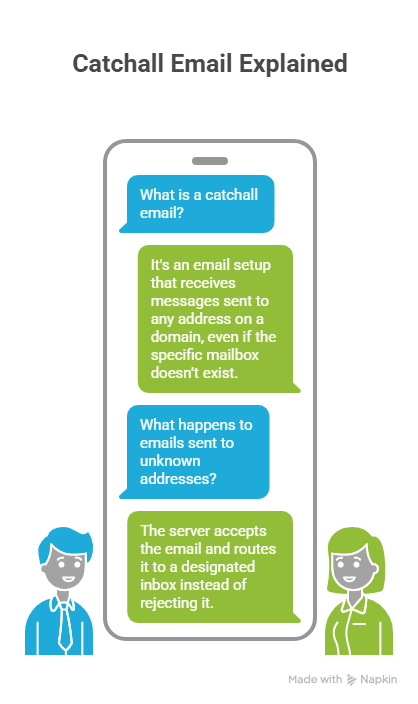
A catchall email (also called a “catch-all”) is an email setup that allows a domain to receive messages sent to any address, even if that specific mailbox doesn’t exist.
Instead of rejecting unknown addresses, the server accepts the email and routes it to a designated inbox.
If a company owns @example.com, a catchall setup would allow emails sent to…
…to all be delivered, even if those addresses were never created.
How catchall emails work
Catchall emails rely on server-level rules that override standard mailbox validation.
Normally, if you send an email to a non-existent address, it bounces. With a catchall enabled, the mail server accepts the message and forwards it to a default inbox.
This is typically configured:
- At the domain or hosting level
- Through email providers like Google Workspace or Microsoft 365
- Using forwarding rules or wildcard addresses
Here are a few situations where catchall emails come into play:
- Someone emails [email protected], but that mailbox doesn’t exist → the message still lands in your main inbox
- A customer mistypes support@ as suport@ → you still receive the inquiry
- A small team skips setting up multiple inboxes and routes everything to one shared account
- A business uses catchall temporarily during a website or email migration to avoid missing messages
The mechanics are simple, but the impact isn’t.
Benefits of using catchall emails
Catchall emails can be useful in situations where missing a message has real consequences. They provide a safety net, especially for businesses that rely on inbound communication.
No email is missed
As we’ve established, a catchall setup captures messages sent to incorrect or non-existent addresses and routes them to a single inbox.
In practice, that means:
- Inquiries still come through even if the address is wrong
- Older or unused email aliases won’t cause lost messages
- Your team has one place to monitor incoming communication
This tends to work best for small teams managing email from a shared inbox, and businesses handling a high volume of inbound requests .
Error recovery for mistyped addresses
Typos in email addresses are common, especially when users are entering them manually.
A catchall setup can recover these mistakes by accepting emails that would otherwise bounce.
Common scenarios include:
- Misspelled names (jon@ vs john@)
- Incorrect department addresses
- Outdated contact details still being used
Instead of losing the message entirely, it still reaches your inbox, giving you a chance to respond and correct the issue.
Challenges and risks of catchall emails
While catchall emails can help capture missed messages, they also introduce several challenges, especially for businesses using email for marketing or outreach.
In many cases, the downsides outweigh the convenience.
Spam overload
Catchall inboxes tend to attract a large volume of unwanted emails.
Because the server accepts messages sent to any address at the domain, spammers can send bulk emails to randomly generated addresses and still get through.
This leads to:
- Cluttered inboxes
- More time spent filtering messages
- A higher risk of missing important emails
Over time, managing a catchall inbox can become more work than it saves.
Verification issues
Catchall domains are difficult to verify because the server accepts all incoming messages, regardless of whether the specific address exists.
From an email verification perspective, this creates uncertainty.
Verification tools can confirm that the domain is valid and the mail server is active, but they cannot reliably confirm whether a specific mailbox is real, or whether a message will actually be read.
As such, catchall emails fall into a “risky” category rather than confirmed valid contacts.
Potential impact on sender reputation
Sending emails to catchall addresses can affect your sender reputation.
Because these addresses are not fully verifiable, they’re more likely to:
- Go unopened
- Belong to inactive or unused inboxes
- Contribute to engagement issues
In some cases, they may also lead to soft bounces or delivery inconsistencies.
If too many emails are sent to low-quality or unresponsive addresses, it can:
- Lower your overall engagement rates
- Increase the likelihood of spam filtering
- Negatively impact future deliverability
For email marketing campaigns, this makes catchall addresses something to handle carefully rather than rely on.
Should you use a catchall email?
Whether you should use a catchall email depends on how you handle incoming messages and how important email deliverability is to your business.
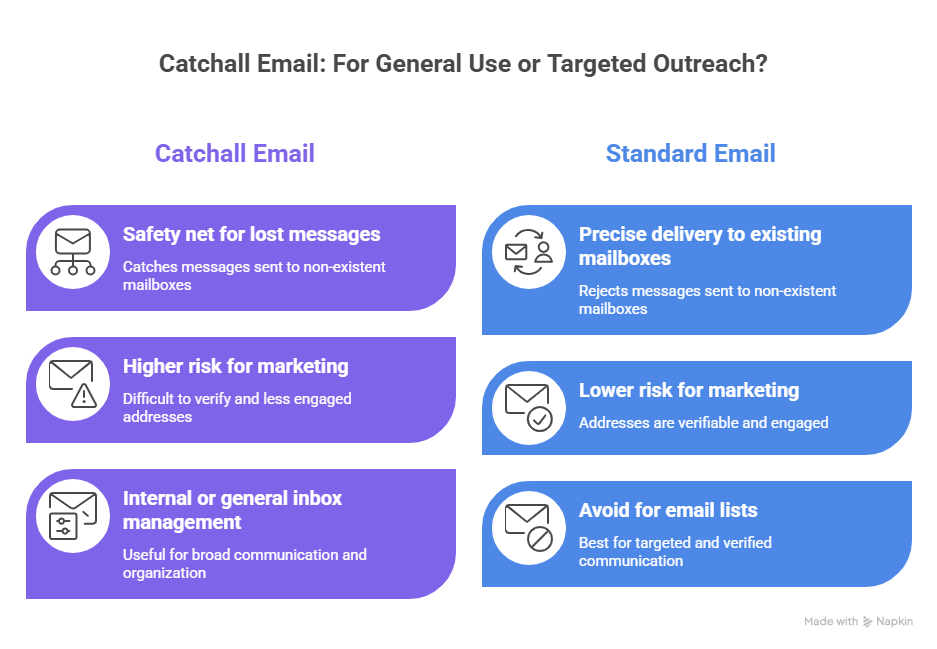
For general communication, a catchall setup can work as a safety net, catching messages that would otherwise be lost.
But for email marketing or outreach, it’s usually not the best approach.
Because catchall addresses are difficult to verify and often less engaged, relying on them can create more risk than value.
In most cases:
- Use catchall for internal or general inbox management
- Avoid relying on catchall addresses in your email lists
Alternatives to catchall emails
Instead of relying on a catchall setup, there are more controlled ways to manage incoming communication.
These include:
- Creating clearly defined inboxes (support@, sales@, info@)
- Using forms to guide users to the right contact point
- Implementing email validation at the point of entry
- Regularly cleaning and verifying your email lists
Best practices for managing catchall emails
If you do decide to use a catchall setup, it’s important to manage it carefully. Without clear processes, catchall inboxes can quickly become difficult to maintain.
These approaches give you more control and fewer surprises.
Email list hygiene
Catchall addresses should be treated as higher-risk contacts in your email list.
Because they can’t be fully verified, it’s important to monitor and clean your list regularly.
Actions to take:
- Removing inactive or unengaged contacts
- Segmenting catchall domains where possible
- Using verification tools to flag risky addresses
Maintaining good list hygiene protects your sender reputation and improves overall campaign performance.
Managing spam effectively
Catchall inboxes tend to receive more spam than standard mailboxes, so filtering becomes essential.
To manage this:
- Set up spam filters and rules at the server level
- Use labels or folders to organize incoming messages
- Regularly review and clean your inbox
Without filtering, important messages can easily get lost among irrelevant ones.
Setup tips for catchall addresses
The exact setup process depends on your email provider, but most platforms follow a similar approach.
In general, you will:
- Set a default inbox to receive messages sent to undefined addresses
- Enable catchall or wildcard routing at the domain level (often called “default address” or “catch-all” in admin settings)
- Test the setup by sending emails to non-existent addresses
Most providers, including Google Workspace, Microsoft 365, and hosting platforms like cPanel, offer this through admin or forwarding settings.
Before enabling it, make sure:
- The destination inbox is actively monitored
- Filters are in place to handle increased volume and spam
- Your team understands how messages will be routed and handled
Conclusion
Catchall emails are useful, but they’re not something to rely on blindly.
They can capture messages that would otherwise be lost, but they also introduce uncertainty. You don’t always know who’s behind the address, whether it’s active, or how it will affect your deliverability.
That trade-off matters more in email marketing than in day-to-day communication.
Use catchall setups for general inbox coverage. For campaigns, stick to clean, verified data and treat catchall addresses with caution.
If you want more visibility into your list, tools like EmailListVerify can help you identify catchall domains and decide how to handle them before you send.
[Verify 100 emails free]
FAQs
Can catchall email addresses be verified?
Not fully. Verification tools can confirm that the domain is valid, but they can’t guarantee that a specific mailbox exists or is actively used. Catchall addresses are typically marked as “risky” rather than fully valid.
What are examples of common catchall email addresses?
Catchall setups apply to entire domains rather than specific addresses. For example, any email sent to @company.com could be accepted, even if the address doesn’t exist.
How do catchall emails affect email campaigns?
They can hurt performance by lowering engagement rates and increasing uncertainty around deliverability. Sending to too many catchall addresses can also impact your sender reputation over time.
Are there tools for identifying catchall addresses in email lists?
Yes. Email verification tools like EmailListVerify can detect catchall domains and flag them as higher-risk contacts, helping you make better decisions about whether to include them in your campaigns.
Join Our Monthly Newsletter
Learn how to improve email deliverability and clean your email lists with and more.