Quick links
TL;DR (Quick Answer)
Catchall emails can help businesses avoid missing inbound messages, but they create challenges for verification, deliverability, and list quality. For marketers, they’re a calculated risk.
Some catchall addresses belong to real decision-makers, while others lead to inactive or unmonitored inboxes. The safest approach is to treat catchall contacts separately, monitor engagement closely, and prioritise verified email data whenever possible.
Catchall emails sound useful on paper. You never miss a message, even if someone types the wrong address or contacts the wrong department.
That can be helpful for businesses that want to capture every inquiry, but there’s a trade-off.
Catchall setups can create problems for email deliverability, list quality, and spam management. They’re also harder to verify, which makes them tricky for email marketing.
That’s why catchall emails need to be handled carefully.
Key takeaways
- A catchall email allows a domain to receive messages sent to any address, even if that mailbox doesn’t exist
- Catchall setups can help capture missed messages caused by typos or incorrect email addresses
- They’re useful for general communication, but introduce risks for email marketing and outreach
- Catchall addresses can’t be fully verified, making them a higher-risk category in email lists
- Sending to too many catchall emails can reduce engagement and impact sender reputation
- Proper list hygiene and filtering are essential when dealing with catchall addresses
- Email verification tools can help identify and manage catchall domains before sending campaigns
What actually is a catch-all (accept-all) email?
At a technical level, a catch-all email setup changes how a mail server handles incoming messages for a domain.
Normally, when an email arrives, the server checks whether the specific mailbox exists. If you send a message to [email protected] and that address hasn’t been created, the server rejects it and returns a bounce message.
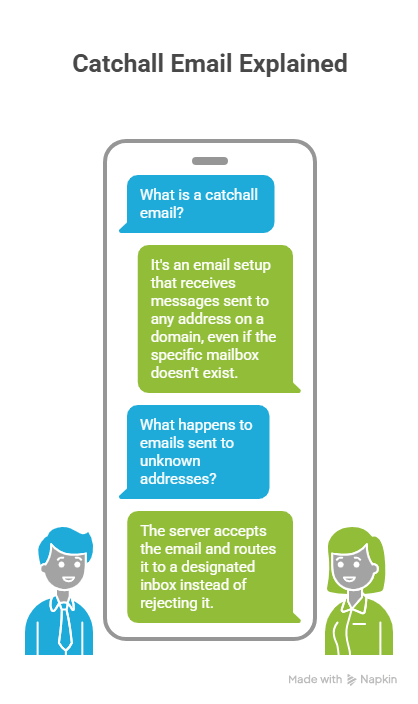
With a catch-all enabled, the server behaves differently. Instead of rejecting unknown addresses, it accepts the message and routes it to a predefined inbox.
You can think of it like a corporate mailroom.
In a normal setup, mail addressed to an unknown employee gets returned to sender because nobody by that name works there.
In a catch-all setup, the mailroom accepts everything anyway and forwards it to a central desk for someone to sort through later.
That routing usually happens through wildcard or default-address rules configured at the mail server level. Once enabled, any undefined address at the domain can potentially receive mail through the catch-all inbox.
For example, all of these could still be accepted:
…even if none of those inboxes technically exist.
This is why catch-all domains are difficult for verification tools to assess with certainty. From the outside, the server appears to accept every address as valid, because it technically does, but that doesn’t mean a real person monitors the inbox or that the message will ever be seen.
Why do companies use them? (The IT perspective)
From an IT perspective, catch-all emails are less about convenience and more about continuity.
For IT teams, catch-all setups prevent inbound emails from getting lost because of setup issues, typos, or infrastructure changes. In larger organisations especially, email environments change constantly. Employees leave, departments get renamed, aliases are retired, and systems migrate between providers. A catch-all setup acts as a fallback layer during those transitions.
For instance, a company migrating from one email platform to another may temporarily enable a catch-all rule to avoid losing messages while inboxes and forwarding rules are still being rebuilt.
Similarly, businesses going through rebrands or mergers often use catch-all routing to capture emails still being sent to outdated addresses.
IT teams also use catch-all setups to simplify mailbox administration.
Instead of maintaining dozens of rarely used aliases manually, messages can route into a monitored shared inbox where staff sort and redirect them internally. For smaller businesses without dedicated support or sales teams, this can decrease setup overhead significantly.
There’s also a visibility and security component.
A catch-all inbox can help administrators identify:
- Misconfigured systems sending to invalid addresses
- Employees or customers using outdated contact details
- Automated tools attempting to contact non-existent mailboxes
- Potential spam or phishing patterns targeting the domain
That said, this broader visibility comes with trade-offs. Accepting every incoming message increases noise, raises spam volume, and makes inbox management more complicated over time.
For that reason, many companies use catch-all routing selectively rather than permanently enabling it across their entire domain infrastructure.
Tip: You can inspect its MX (Mail Exchange) records to see which mail servers are configured for the domain and identify potential catch-all setups. EmailListVerify’s MX Lookup can check domain-level email routing and assess potential deliverability risks before you send.
The catch-all dilemma: risk vs. reward for marketers
For marketers and sales teams, catch-all domains create a difficult trade-off.
On one hand, they introduce uncertainty. You can’t fully verify whether a specific inbox exists, whether anyone actively monitors it, or how engagement will affect your sender reputation over time.
On the other hand, some catch-all addresses belong to real decision-makers, active departments, or valuable leads that would otherwise be missed entirely.
As such, catch-all emails sit in a gray area for email outreach. They aren’t automatically bad, but they also shouldn’t be treated the same way as fully verified contacts.
The risks
The biggest issue with catch-all domains is uncertainty.
Because the mail server accepts all incoming messages, verification tools can confirm that the domain exists, but not whether a specific mailbox is real or actively used. That makes catch-all addresses inherently riskier than standard verified contacts.
Some of the most common risks include:
- Spam traps: Some catch-all domains may contain inactive or monitored inboxes designed to identify poor sending practices.
- Unmonitored inboxes: Even if the address technically accepts mail, nobody may actually read the messages.
- Delayed bounces: Some servers initially accept messages before rejecting them later, making list quality harder to assess accurately.
- Lower engagement rates: Catch-all addresses are more likely to go unopened or ignored.
- Sender reputation issues: Large volumes of low-engagement recipients can reduce deliverability over time.
For high-volume email marketing, these risks add up quickly. Sending aggressively to catch-all domains without filtering or segmentation can damage campaign performance and increase spam filtering.
The rewards
Despite the risks, catch-all emails can still provide value in the right situations.
In B2B outreach especially, catch-all domains sometimes route messages to shared departmental inboxes or assistants managing communication for executives and other targets.
A message sent to an uncertain address may still reach the right person internally.
Catch-all setups can also help recover opportunities that would otherwise be lost because of:
- Typo-related email errors
- Outdated contact information
- Missing aliases during company transitions
- Unlisted or undocumented inboxes
For smaller, carefully targeted outreach campaigns, some marketers intentionally include catch-all addresses because the potential upside outweighs the limited sending risk.
The key is treating catch-all contacts differently from fully verified email addresses rather than mixing them into standard campaigns without additional filtering or monitoring.
Send or skip? A quick decision matrix
Not every catch-all address carries the same level of risk.
A carefully targeted outreach email to a high-value prospect is very different from blasting thousands of unverified catch-all addresses in a bulk campaign.
The right approach depends on the context, the importance of the contact, and how much deliverability risk you’re willing to tolerate.
This quick matrix gives a general framework for deciding when catch-all addresses are worth including in your outreach strategy and when they’re better avoided.
| Scenario | Send or skip? | Why |
| High-value B2B prospect | Send cautiously | The potential upside may outweigh the deliverability risk |
| Warm inbound lead | Send | Existing engagement lowers the overall risk |
| Small targeted outreach list | Send carefully | Easier to monitor engagement and reply rates closely |
| Shared departmental inbox | Usually send | These are often actively monitored by teams |
| Old scraped email list | Skip | High risk of inactive or low-quality contacts |
| Mass B2C campaign | Skip | Catch-all uncertainty creates unnecessary deliverability risk |
| Re-engagement campaigns | Usually skip | Catch-all addresses are often inactive or unmonitored |
| Cold outreach to enterprise accounts | Test carefully | Some enterprise domains intentionally use catch-all routing |
Should you use a catchall email?
Whether you should use a catchall email depends on how you handle incoming messages and how important email deliverability is to your business.
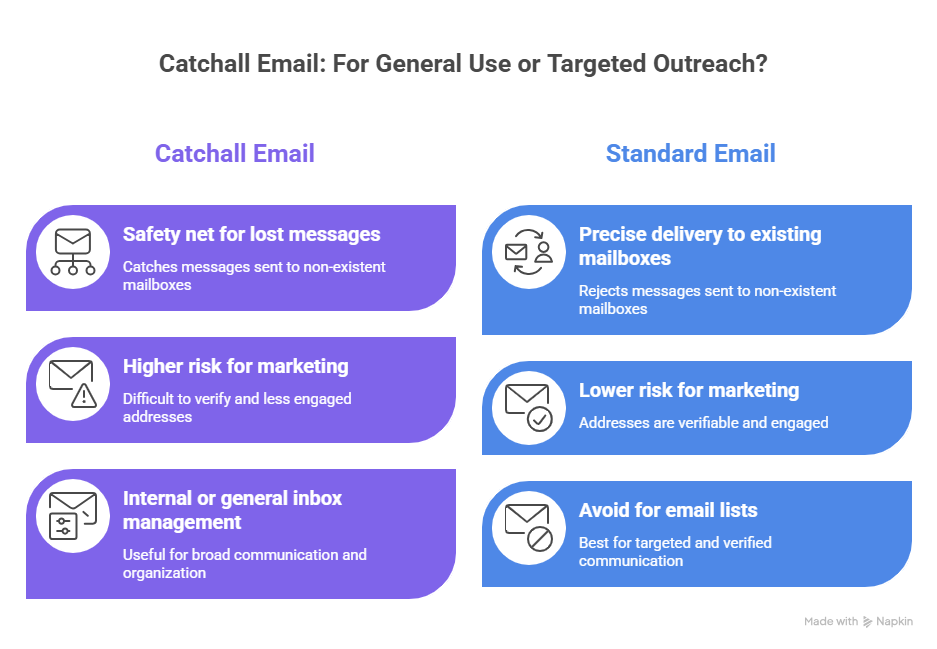
For general communication, a catchall setup can work as a safety net, catching messages that would otherwise be lost.
But for email marketing or outreach, it’s usually not the best approach.
Because catchall addresses are difficult to verify and often less engaged, relying on them can create more risk than value.
In most cases:
- Use catchall for internal or general inbox management
- Avoid relying on catchall addresses in your email lists
Alternatives to catchall emails
Instead of relying on a catchall setup, there are more controlled ways to manage incoming communication.
These include:
- Creating clearly defined inboxes (support@, sales@, info@)
- Using forms to guide users to the right contact point
- Implementing email validation at the point of entry
- Regularly cleaning and verifying your email lists
4 strategies for mailing catch-all addresses safely
If you decide to include catch-all addresses in your outreach or email marketing, the key is treating them differently from fully verified contacts.
1. Segment catch-all addresses into separate campaigns
Avoid mixing catch-all contacts directly into your primary email lists.
Instead, place them into separate segments or lower-volume campaigns so you can monitor:
- Open rates
- Reply rates
- Bounce behavior
- Spam complaints
2. Start with lower sending volumes
Large sends to catch-all domains create unnecessary risk, especially if the list hasn’t been engaged recently.
Instead of blasting thousands of uncertain contacts at once:
- Start with smaller batches
- Watch engagement carefully
- Scale gradually if performance remains healthy
3. Use simpler email formatting
Catch-all inboxes are already considered higher-risk from a deliverability perspective.
To reduce additional filtering triggers:
- Use clean, plain-text or lightly formatted emails
- Avoid excessive images or promotional styling
- Keep subject lines straightforward
- Focus on relevance and personalization
This is especially important for cold outreach campaigns targeting B2B domains.
4. Remove unengaged catch-all contacts quickly
If a catch-all address never opens, clicks, or replies after multiple attempts, continuing to send usually creates more risk than value.
A common approach is to:
- Monitor engagement closely after the first send
- Retry once with a different subject line or angle
- Remove the contact after one or two unengaged attempts
Keeping inactive catch-all addresses on your list long term can slowly damage engagement metrics and sender reputation over time.
Conclusion
Catchall emails are useful, but they’re not something to rely on blindly.
They can capture messages that would otherwise be lost, but they also introduce uncertainty. You don’t always know who’s behind the address, whether it’s active, or how it will affect your deliverability.
That trade-off matters more in email marketing than in day-to-day communication.
Use catchall setups for general inbox coverage. For campaigns, stick to clean, verified data and treat catchall addresses with caution.
If you want more visibility into your list, tools like EmailListVerify can help you identify catchall domains and decide how to handle them before you send.
[Verify 100 emails free]
FAQs
Can catchall email addresses be verified?
Not fully. Verification tools can confirm that the domain is valid, but they can’t guarantee that a specific mailbox exists or is actively used. Catchall addresses are typically marked as “risky” rather than fully valid.
What are examples of common catchall email addresses?
Catchall setups apply to entire domains rather than specific addresses. For example, any email sent to @company.com could be accepted, even if the address doesn’t exist.
How do catchall emails affect email campaigns?
They can hurt performance by lowering engagement rates and increasing uncertainty around deliverability. Sending to too many catchall addresses can also impact your sender reputation over time.
Are there tools for identifying catchall addresses in email lists?
Yes. Email verification tools like EmailListVerify can detect catchall domains and flag them as higher-risk contacts, helping you make better decisions about whether to include them in your campaigns.
Join Our Monthly Newsletter
Learn how to improve email deliverability and clean your email lists with and more.