Quick links
TL;DR (Quick Answer)
Double opt-in requires subscribers to confirm their email address before being added to your mailing list. While it creates extra friction and can lower raw signup numbers, it also improves deliverability, protects sender reputation, and builds a more engaged subscriber base.
For many businesses, especially those struggling with spam complaints, fake signups, or deliverability issues, double opt-in is one of the safest ways to maintain long-term email list quality.
Growing a healthy email list that consistently reaches the inbox is hard. Double opt-in was created to help email marketers sidestep issues that come from single opt-in.
Instead of adding subscribers immediately after they fill out a form, double opt-in asks them to confirm their subscription through a verification email first.
It adds an extra step to the signup process, but that extra step filters out fake addresses, typo-filled submissions, spam bots, and low-intent subscribers before they ever reach your database.
For some businesses, that tradeoff is absolutely worth it. For others, the added step can slow list growth too much.
The real question isn’t whether double opt-in is universally “better.” It’s whether the benefits outweigh the drop-off rate for your specific audience, acquisition strategy, and deliverability goals.
Key takeaways
- Double opt-in requires subscribers to confirm their email address after signup
- It helps prevent fake, typo-filled, and bot-generated signups
- Double opt-in improves list quality and protects sender reputation
- Single opt-in grows lists faster but carries more deliverability risk
- Confirmation emails should be short, clear, and easy to complete
- Double opt-in is especially valuable for new lists, giveaways, and high-risk signup sources
- Strong list hygiene still matters even with double opt-in enabled
What is double opt-in and how does it work?
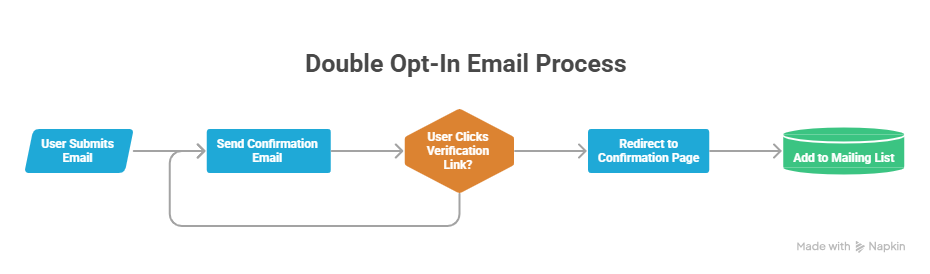
Double opt-in email process
Double opt-in is an email subscription process that requires users to confirm their email address before being added to an active mailing list.
Instead of subscribing immediately after filling out a form, the user must complete an extra verification step by clicking a confirmation link sent to their inbox.
That additional step confirms that the email address is real, and that the person actually intended to subscribe.
The process usually works like this:
- A user submits their email address through a signup form.
- An automated confirmation email is sent to their inbox.
- The user clicks the verification link inside the email.
- The user is redirected to a confirmation or thank you page.
- The email address is officially added to the active mailing list.
If the user never clicks the confirmation link, they never become an active subscriber.
Single opt-in vs. double opt-in: which is better?
The answer depends on what matters more to your business, whether that’s maximum list growth or maximum list quality.
Single opt-in is quick, easy, and usually generates more subscribers faster. Double opt-in sacrifices some signup volume in exchange for cleaner data, stronger engagement, and safer deliverability.
Neither approach is universally correct for every situation.
| Feature | Single opt-in | Double opt-in |
| Signup process | Subscriber added immediately | Subscriber must confirm via email |
| List growth speed | Faster | Slower |
| Friction level | Lower | Higher |
| Risk of fake or typo emails | Higher | Lower |
| Spam bot protection | Weaker | Stronger |
| Deliverability protection | Lower | Higher |
| Subscriber engagement quality | More mixed | Usually stronger |
The case for single opt-in
Single opt-in is popular because it keeps the signup process simple.
Single opt-in can work well for:
- Highly targeted B2B audiences
- Trusted brands with strong signup sources
- Low-friction lead generation campaigns
- Businesses with strict list hygiene practices already in place
The downside is that invalid, mistyped, fake, or bot-generated addresses enter the database much more easily.
4 powerful benefits of using double opt-in
Double opt-in slows list growth slightly, but the subscribers who make it through the process are usually much more valuable over time.
For many businesses, the long-term deliverability and engagement benefits outweigh the temporary drop in signup volume.
1. Stronger email deliverability
Double opt-in stops fake, mistyped, and invalid email addresses before they ever enter your database.
That matters because hard bounces damage sender reputation with mailbox providers like Gmail and Yahoo. If too many emails bounce, inbox providers start viewing the sender as lower quality or potentially risky.
Because only confirmed addresses get added to the list, double opt-in reduces bounce rates and keeps your sender reputation healthier over time.
2. A higher-quality, more engaged list
Subscribers who take the time to confirm their email address are usually more intentional and engaged from the start.
They actively chose to subscribe instead of being added accidentally, mistyping an address, or submitting a low-interest signup.
That often leads to:
- Higher open rates
- Stronger click-through rates
- Better conversion rates
- Fewer spam complaints
Some industry studies have found that double opt-in lists can generate substantially higher engagement metrics than single opt-in lists, including stronger open rates, higher click-through rates, fewer unsubscribes, and lower bounce rates because the subscriber base is cleaner and more intentional from the beginning.
In fact, GetResponse found that double opt-in lists achieved a 35.72% average open rate compared to 27.36% for single opt-in lists, with higher click-through rates reported across multiple industries.
3. Better legal and compliance protection
Double opt-in creates a clear record of consent.
That’s valuable for privacy regulations like GDPR in Europe and CASL in Canada, where businesses may need to prove that a user intentionally subscribed to marketing emails.
While double opt-in is not legally required in most regions, it creates a much stronger consent trail if complaints or disputes happen later.
4. A better first impression
The confirmation email is often the first message a subscriber receives from your brand.
That creates an opportunity to:
- Introduce your voice and tone
- Reinforce expectations
- Deliver a lead magnet
- Guide subscribers toward useful content
- Start building trust immediately
A well-designed confirmation flow can make the signup experience feel more intentional and professional instead of purely transactional.
The drawbacks: is double opt-in hurting your growth?
The biggest downside of double opt-in is fewer people complete the signup process.
It’s completely normal to lose a percentage of subscribers between the form submission and the confirmation click. Litmus notes that double opt-in can reduce list growth by roughly 20% to 30% because not every user completes the second confirmation step.
Some users:
- Forget to check their inbox
- Miss the confirmation email
- Get distracted before clicking
- Lose interest during the extra step
That drop can feel painful, especially for brands focused heavily on rapid list growth.
Double opt-in also requires more setup work behind the scenes.
Businesses need:
- Signup forms
- Confirmation emails
- Automation workflows
- Thank you pages
- Subscriber status management
For smaller teams, that added complexity can feel unnecessary if their current list quality and deliverability are already strong.
This is why double opt-in isn’t automatically the right choice for every business. The tradeoff is always between faster growth and cleaner, more reliable subscriber data.
When should you use double opt-in? (ideal use cases)
Double opt-in makes the biggest difference when list quality and sender reputation matter more than maximizing raw signup volume.
Some situations make it especially valuable.
Starting a brand new email list
New sending domains and IP addresses have no reputation history yet.
Double opt-in protects that early reputation by filtering out invalid or low-quality addresses before the first campaigns are sent.
Running giveaways or contests
Contests and giveaways attract large numbers of low-intent signups, fake addresses, and spam bots.
Double opt-in acts as a filter that removes many of those risky submissions automatically before they damage deliverability.
Recovering from deliverability problems
If your emails already struggle with:
- Low open rates
- Spam complaints
- Hard bounces
- Blacklist issues
- Spam folder placement
…double opt-in can stabilize list quality moving forward.
Collecting leads from multiple sources
The more signup sources you use, the harder it becomes to maintain consistent list quality.
Double opt-in helps verify that subscribers coming from webinars, paid ads, lead magnets, events, or partnerships are real and intentional.
How to optimize your double opt-in funnel (lower drop-offs)
Double opt-in works best when the confirmation process feels fast, obvious, and easy.
A confusing signup flow can cause legitimate subscribers to abandon the process before completing verification. Small improvements to the funnel often make a noticeable difference.
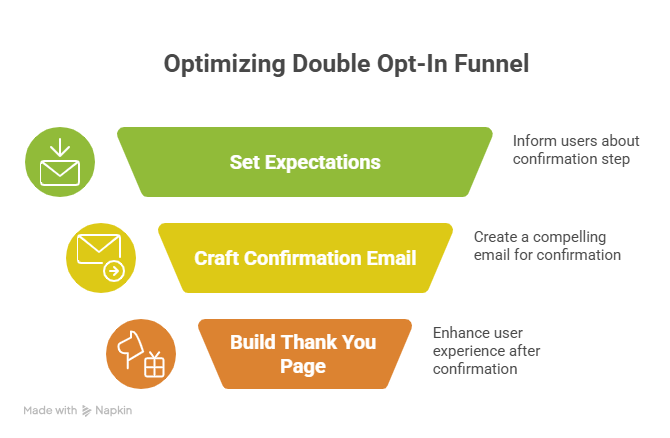
Optimizing your double opt-in funnel
1. Optimize the lead capture form
Set expectations before the user submits the form.
A short line of microcopy under the CTA button helps prepare subscribers for the next step.
Something simple like:
- “Check your inbox to confirm your subscription”
- “One more step after signup”
- “You’ll receive a confirmation email in a few minutes”
That small reminder minimizes confusion and helps users look for the confirmation email immediately.
2. Craft a high-converting confirmation email
The confirmation email should be extremely clear and easy to scan.
Avoid treating it like a full newsletter. The only goal is getting the subscriber to click the verification button.
A strong confirmation email usually includes:
- A direct subject line
- Minimal body copy
- One obvious CTA button
- Clear instructions
- Recognizable branding
Subject lines like “Confirm your subscription” or “Action required: Verify your email address” generally perform well because the intent is immediately clear.
3. Build a rewarding thank you page
Many businesses send subscribers to a generic default confirmation page and miss an easy engagement opportunity.
A custom thank you page can:
- Deliver the lead magnet immediately
- Welcome the subscriber properly
- Recommend popular articles
- Introduce your product
- Encourage social follows
- Explain what emails to expect next
That final step helps the signup process feel intentional instead of mechanical.
Platform-specific implementation
Most email marketing platforms support double opt-in, although the setup process and customization options vary.
Managing double opt-in in Mailchimp
Mailchimp strongly encourages double opt-in because it helps protect deliverability across their platform.
When using Mailchimp’s native signup forms, double opt-in is often enabled by default or heavily recommended during setup. The platform handles the confirmation email and verification flow automatically.
It’s worth noting that some third-party form integrations allow businesses to bypass Mailchimp’s standard double opt-in flow, which creates more flexibility but also more deliverability risk if list hygiene is weak.
Setting up double opt-in in HubSpot
HubSpot allows businesses to enable or disable double opt-in depending on their subscription tier and configuration.
The platform also gives more customization options for:
- Confirmation emails
- Follow-up workflows
- Thank you pages
- Branding
- Automation logic
That flexibility makes HubSpot useful for businesses that want tighter control over the subscriber journey and onboarding experience.
Examples of great double opt-in emails
The best confirmation emails are simple, clear, and make the next step feel obvious and easy to complete.
Example 1: Minimal and direct
Some brands keep confirmation emails extremely short.
These emails usually include:
- A clear subject line like “Confirm your subscription”
- One short explanation sentence
- A large confirmation button
- Almost no competing links or distractions
For example:
“Thanks for signing up. Please confirm your email address below to activate your subscription.”
This style works well because the subscriber instantly understands what to do next.
Example 2: Brand-focused welcome email
Other companies use the confirmation step as a lightweight introduction to their brand personality and content style.
These emails often include:
- Consistent colors and branding
- A friendly welcome message
- A short explanation of what subscribers will receive
- Expectations around email frequency or topics
This approach works well for newsletters, creator brands, SaaS products, and e-commerce companies with a strong tone of voice.
Example 3: Incentive-driven confirmation email
Some businesses connect the confirmation step directly to a reward or resource.
For example, the confirmation email may unlock:
- A downloadable lead magnet
- A discount code
- Webinar access
- Exclusive content
- A free template or guide
This creates a stronger reason for subscribers to complete verification instead of ignoring the email or forgetting about the signup entirely.
Beyond the opt-in: maintaining list hygiene
Double opt-in builds a cleaner email list from the start, but it’s not a permanent fix for deliverability problems.
Even verified subscribers become inactive over time. People change jobs, abandon inboxes, stop opening emails, or lose interest in a brand entirely.
That’s why ongoing list hygiene still matters.
Even with double opt-in enabled, ongoing email verification still plays an important role in protecting deliverability over time.
EmailListVerify lets businesses identify invalid, disposable, typo-filled, and risky email addresses before they damage sender reputation or increase bounce rates. Regular verification also makes it easier to clean inactive databases and maintain healthier engagement metrics as lists grow.
[Verify 100 emails free]
FAQs
Is double opt-in required by law?
Usually no. Most privacy regulations, including GDPR, do not explicitly require double opt-in.
However, double opt-in creates a much stronger record of consent because the subscriber actively confirms ownership of the email address. That makes it one of the safest approaches for compliance and dispute protection.
How long should the confirmation link stay active?
Many businesses keep confirmation links active for 24 to 48 hours. That window is usually long enough for legitimate subscribers to confirm while helping prevent old or abandoned verification emails from being used later by bots or unintended recipients.
Should I switch my existing single opt-in list to double opt-in?
Usually no, especially if the current list is healthy and engaged. Forcing existing active subscribers to re-confirm can create unnecessary list loss. In most cases, businesses only apply double opt-in to new subscribers moving forward while continuing to clean and segment their older database normally.
Join Our Monthly Newsletter
Learn how to improve email deliverability and clean your email lists with and more.