Quick links
Disposable email addresses help users avoid spam and protect their privacy, but they can create deliverability and lead quality problems for marketers. Throwaway inboxes, email aliases, and forwarding services all work differently, but they can lead to fake signups, inaccurate analytics, hard bounces, and lower engagement. Blocking disposable emails with verification tools, signup validation, and better trust signals helps keep your database cleaner without damaging the user experience.
Disposable email addresses are temporary or privacy-focused email accounts that users create to avoid giving out their primary inboxes.
Some disappear after a few minutes. Others work as forwarding aliases that hide a user’s real email address indefinitely.
For users, these tools provide privacy and protection from spam. For marketers, they can create problems ranging from low-quality leads to hard bounces and damaged sender reputation.
And disposable emails are becoming more common as privacy concerns grow. According to Pew Research Center, 79% of Americans say they are concerned about how companies use their personal data online.
That means the goal is not just blocking disposable emails, It’s also understanding why users rely on them in the first place.
Key takeaways
- Disposable email addresses are often used to avoid spam and protect privacy
- Throwaway inboxes, aliases, and forwarding services all behave differently
- Disposable emails can reduce lead quality and increase hard bounces
- High bounce rates can damage sender reputation and inbox placement
- Manual blacklists can stop some disposable domains
- Real-time email verification catches risky addresses during signup
- Clear privacy messaging and better signup UX can reduce fake submissions
What is a disposable email address (DEA)?
A disposable email address is an email account used temporarily or primarily for privacy protection instead of long-term communication.
There are three common types.
| Type | Example | Typical lifespan | Risk level for marketers | How to detect |
| Throwaway / burner inbox | 10 Minute Mail, Mailinator | Minutes to hours | High | Disposable domain blacklists |
| Email alias | Apple Hide My Email, Firefox Relay | Long-term | Medium | Harder to detect directly |
| Forwarding service | SimpleLogin, AnonAddy | Long-term | Medium | Verification tools and domain analysis |
Throwaway or burner inboxes
Throwaway email services create temporary inboxes that users can access immediately without registration.
Examples include:
- @mailinator.com
- @10minutemail.com
- @guerrillamail.com
These addresses are often used for:
- One-time downloads
- Free trials
- Coupon access
- Avoiding promotional emails
Because many expire quickly, they frequently lead to inactive contacts and poor-quality leads.
Email aliases
Alias systems create alternative email addresses that forward messages to a user’s real inbox.
Apple’s Hide My Email is one of the best-known examples.
Instead of sharing [email protected], a user may share something like [email protected]
The user still receives the messages, but their real address stays hidden. These addresses aren’t necessarily low-quality leads, but they can make identity tracking and customer matching more difficult.
Forwarding services
Forwarding services sit somewhere between disposable inboxes and aliases.
Platforms like:
- SimpleLogin
- Firefox Relay
- AnonAddy
…allow users to generate forwarding addresses that redirect emails to their primary inboxes.
Unlike burner inboxes, these accounts may remain active long-term.
However, they still create challenges for marketers because users can disable forwarding or abandon aliases at any time.
Why users hide behind temporary emails
Most users are not creating disposable email addresses to sabotage marketing campaigns.
They are usually trying to protect themselves from spam, excessive follow-ups, data sharing, or unwanted sales outreach.
From a consumer standpoint, many of those concerns are reasonable.
The average office worker receives more than 120 emails per day. Many users have learned that giving out their primary email address often leads to:
- Promotional overload
- Retargeting emails
- Cold outreach
- Data sharing between companies
- Long unsubscribe processes
Disposable emails give users more control over who can contact them and for how long.
In some cases, the issue may also be trust.
If a signup form asks for too much information, looks outdated, or doesn’t clearly explain how data will be used, users are more likely to hide behind temporary inboxes or aliases instead of sharing a real address.
That is why blocking disposable emails alone isn’t always enough. Improving trust during signup can reduce fake submissions before they happen.
The hidden costs of disposable emails on your database
Disposable email addresses do more than clutter your CRM with low-quality contacts.
Over time, they can affect deliverability, campaign reporting, sender reputation, and even your relationship with your email service provider.
One of the biggest risks is hard bounces.
Many burner inboxes expire quickly or become inactive after a short period. When campaigns continue sending to those addresses, bounce rates start increasing.
The chain reaction usually looks something like this:
Disposable emails increase → hard bounces increase → mailbox providers lose trust in the sender → inbox placement drops
Over time, this can lead to:
- Lower engagement rates
- More spam filtering
- Reduced inbox placement
- Skewed campaign analytics
- ESP warnings or sending restrictions
Some ESPs may temporarily suspend accounts if bounce rates become too high, especially during large campaigns or cold outreach pushes.
Disposable emails can also distort lead quality metrics. A contact database filled with fake trials, temporary signups, or abandoned aliases makes it harder to:
- Measure engagement accurately
- Score leads properly
- Forecast campaign performance
- Maintain healthy sender reputation over time
Because B2B databases naturally decay over time already, disposable addresses accelerate the problem even further. Research commonly estimates that around 22-30% of B2B contact data becomes outdated every year because of job changes and abandoned inboxes.
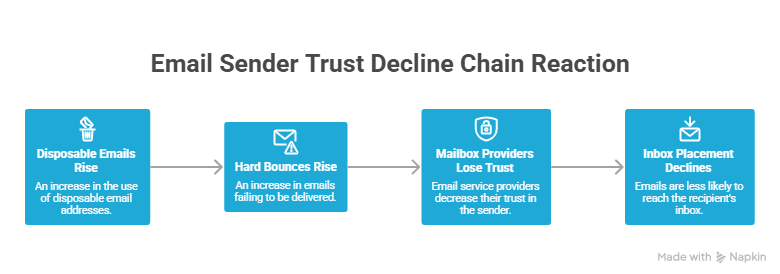
Email sender trust decline chain reaction
How to stop disposable emails at the source
The best way to handle disposable email addresses is stopping them before they enter your database.
A combination of signup validation, verification tools, and better trust signals usually works better than relying on a single blocking method.
Method 1: The DIY approach (Regex and blacklists)
Many companies block disposable email domains directly inside their signup forms.
This usually involves:
- Regex validation
- Domain blacklists
- Form builder filters
- CRM validation rules
Some of the most commonly blocked disposable domains include:
- mailinator.com
- 10minutemail.com
- guerrillamail.com
- temp-mail.org
- yopmail.com
- sharklasers.com
- throwawaymail.com
- dispostable.com
- maildrop.cc
- fakeinbox.com
This approach works well for obvious burner inboxes, but disposable email services constantly create new domains. Maintaining blacklists manually can quickly become difficult at scale.
Tip: If your bounce rates suddenly increase or emails start landing in spam, use our free blacklist checker to see whether your domain or IP address has been added to common email blacklists.
Method 2: Using an email verification API
Real-time email verification checks email addresses during the signup process before the contact enters your CRM.
When a user submits a form, the verification system can:
- Check whether the domain exists
- Detect disposable email providers
- Identify risky or temporary inboxes
- Validate mailbox deliverability
- Flag suspicious signup behavior
This happens almost instantly in the background before the form submission is accepted.
Using an email verification API decreases:
- Hard bounces
- Fake signups
- Low-quality leads
- Spam risks
- Database decay over time
Verify email addresses in real time with EmailListVerify to stop disposable and risky inboxes before they affect deliverability.
Method 3: Improving your lead magnet trust factors
Sometimes users choose disposable emails because they don’t fully trust the signup experience.
A few small trust improvements can increase the likelihood of users sharing real email addresses:
- Clearly explain how emails will be used
- Link to your privacy policy near forms
- Avoid asking for unnecessary information
- Use less aggressive sales language
- Explain email frequency upfront
- Make unsubscribing simple
Even small UX improvements can reduce fake submissions and improve overall lead quality.
Next steps
Disposable email addresses are becoming more common as users look for better privacy and more control over their inboxes. Some are harmless, while others create serious deliverability and lead quality problems over time.
The goal is not just blocking temporary inboxes. It is also reducing the reasons users feel uncomfortable sharing their real email addresses in the first place.
Combining verification tools, signup validation, and stronger trust signals helps keep your database cleaner without creating unnecessary friction for legitimate users.
Use EmailListVerify to detect disposable email addresses, cut down on hard bounces, and improve lead quality before campaigns go out.
FAQs
Are disposable email addresses always fake?
No. Some disposable or alias-based email addresses belong to legitimate users who simply want more privacy or spam protection.
What is the difference between a disposable email and an alias?
Disposable inboxes are usually temporary and expire quickly. Aliases typically forward messages to a user’s real inbox while hiding the original address.
Do disposable emails hurt deliverability?
They can. Expired burner inboxes and abandoned temporary accounts often lead to hard bounces, which may damage sender reputation over time.
Can you block disposable email addresses?
Yes. Many companies block known disposable domains using form validation, blacklists, or real-time email verification tools.
Why do users sign up with temporary email addresses?
Most users do it to avoid spam, protect privacy, or limit marketing emails after downloads, trials, or gated content signups.
Is Apple Hide My Email considered a disposable email?
It is technically an email alias service rather than a temporary burner inbox, but many marketers group it into the broader disposable email category because it hides the user’s real address.
Join Our Monthly Newsletter
Learn how to improve email deliverability and clean your email lists with and more.


