Quick links
TL;DR (Quick Answer)
no-reply@ email addresses may cut down inbox clutter, but they also frustrate customers and can hurt deliverability. Mailbox providers look at engagement signals like replies when deciding where emails belong, and blocking replies removes one of the clearest trust signals available.
A monitored inbox, helpdesk workflow, or simple autoresponder gives users a better experience while keeping communication manageable for your team.
Most businesses use no-reply@ email addresses for one reason. They don’t want to deal with incoming replies.
On the surface, that makes sense. If you’re sending newsletters, automated notifications, or transactional emails at scale, a crowded inbox sounds like unnecessary extra work.
The problem is that no-reply@ addresses often create bigger issues than they solve.
They frustrate customers, block communication, weaken trust, and can even affect deliverability over time. Some mailbox providers also treat no-reply@ senders more like automated bulk mail than genuine conversations, which can make it harder to consistently land in the inbox.
Fortunately, you don’t have to choose between inbox chaos and shutting customers out completely. There are better ways to manage replies without hurting the customer experience.
Key takeaways
- no-reply@ addresses create a frustrating customer experience
- Blocking replies can reduce valuable engagement signals for deliverability
- Some mailbox providers treat no-reply@ senders more like bulk automation
- GDPR and privacy requests become harder when replies are blocked
- A managed inbox or helpdesk setup is usually a better long-term solution
- Autoresponders work better than completely blocking communication
The problem with no-reply@ email addresses
Using a no-reply@ email address may seem like an easy way to reduce inbox clutter, but it often creates problems for both customers and deliverability.
From a customer experience perspective, it can feel dismissive. Someone receives a billing notice, onboarding email, shipping update, or promotional campaign and has a quick question, but the reply channel is blocked.
Instead of responding directly, they now have to search your site for a support form or another contact method.
That frustration adds up over time, especially when customers feel like communication only works one way.
There’s also a deliverability downside many businesses overlook.
Mailbox providers pay attention to engagement signals. Replies are one of the clearest indicators that recipients actually want your emails. When a sender blocks replies entirely, those positive engagement signals disappear.
As a result, no-reply@ emails are often treated more like automated bulk mail, which can increase the chances of landing in promotion or spam folders.
Blocking replies can also create compliance headaches. Under GDPR and similar privacy regulations, users need a practical way to contact businesses about personal data requests, including deletion or access requests. A dead-end email address makes that process unnecessarily difficult for users.
3 better alternatives to no-reply emails
Businesses don’t need to choose between a completely unmanaged inbox and shutting replies down entirely.
There are several ways to keep incoming email organized while still giving customers a clear communication channel. The right approach usually depends on reply volume, team size, and the type of emails being sent.
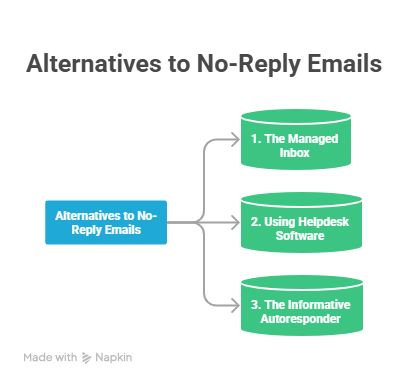
3 alternatives to no-reply@ emails
1. A managed hello@ or support@ inbox
The simplest replacement for a no-reply@ address is a monitored inbox like [email protected] or [email protected].
Even if your team can’t respond immediately, allowing replies creates a more human experience. Customers know there’s a real communication channel available if they have a question or problem.
It can also help deliverability. When recipients reply naturally to emails, it signals to mailbox providers that the sender is legitimate and trusted.
For smaller teams or lower reply volumes, this approach is often enough on its own.
2. Helpdesk software that routes replies automatically
If incoming replies become difficult to manage manually, helpdesk software can keep communication organized without blocking it completely.
Platforms like Zendesk, Help Scout, Freshdesk, and Intercom can automatically:
- Route conversations to the right team
- Assign support tickets
- Prioritize urgent issues
- Decrease duplicate replies
- Keep customer history in one place
This lets customers respond naturally while giving your team a structured workflow behind the scenes.
3. An informative autoresponder
Sometimes businesses genuinely don’t want replies sent to a specific inbox. In those situations, an autoresponder works far better than a hard no-reply@ block.
Instead of rejecting communication entirely, an automatic response can explain:
- That the inbox isn’t actively monitored
- Where support requests should go
- How users can contact the right department
- Where documentation or self-service resources are located
That creates a much smoother experience than a dead-end email address.
Autoresponder templates you can steal
Autoresponders don’t need to sound robotic or overly formal.
The best ones set expectations clearly, explain where users should go for help, and keep the tone friendly and professional. Here are a few simple templates businesses can adapt for different situations.
Template 1
Subject: We received your message
Hi there,
Thanks for reaching out. Our team received your message and will get back to you as soon as possible.
Current response times are around 1-2 business days.
If your request is urgent, please visit our support center here: [LINK]
Thanks,
The Support Team
Template 2
Subject: This inbox is not monitored
Hi,
Replies to this email address are not actively monitored.
For billing questions, account support, or technical help, please contact our team here: [LINK]
Thanks for understanding.
Template 3
Subject: Need help?
Hi there,
Thanks for your message.
This inbox is only used for outgoing notifications, but our support team is happy to help. You can reach us here: [LINK]
Thanks,
The Team
no-reply@ vs. reply-friendly email addresses
The differences between no-reply@ addresses and reply-friendly inboxes go beyond simple inbox management.
They affect how customers interact with your brand, how mailbox providers interpret engagement signals, and how easy it is for users to reach your team when they need help.
The table below compares the biggest differences between the two approaches.
| Feature | [email protected] | hello@ or [email protected] |
| Deliverability | More likely to be treated as automated bulk mail | Encourages engagement signals like replies |
| Customer trust | Feels impersonal and discourages communication | Feels more human and approachable |
| Two-way communication | Blocks questions and feedback | Allows direct customer interaction |
| User experience | Can frustrate users looking for help | Creates a smoother support experience |
| Inbox management | Lower upfront effort | Requires some workflow or routing setup |
| Compliance | Can create friction for privacy or support requests | Gives users a clear contact path |
Conclusion
no-reply@ email addresses may seem convenient, but they often create problems for both customers and deliverability.
Blocking replies removes an important communication channel, weakens engagement signals, and can make your emails feel less trustworthy. Over time, that can hurt both the customer experience and inbox placement.
A monitored inbox, helpdesk workflow, or well-written autoresponder gives users a better experience without creating inbox chaos for your team.
In most cases, making it easier for people to reply is better for your brand, your relationships, and your email performance long term.
Join Our Monthly Newsletter
Learn how to improve email deliverability and clean your email lists with and more.