Quick links
TL;DR (Quick Answer)
Spam complaints are one of the fastest ways to damage sender reputation and hurt email deliverability.
When recipients click “Mark as Spam” in Gmail, Yahoo, or Outlook, mailbox providers treat that as a strong negative engagement signal. High complaint rates can reduce inbox placement, trigger filtering, and eventually lead to blacklisting or bulk sender penalties.
To keep complaint rates low, businesses need strong list hygiene, easy unsubscribe options, proper email authentication, and ongoing engagement management.
Every email marketer loses subscribers eventually. That part is normal. The real problem starts when frustrated recipients stop unsubscribing and start clicking “Mark as Spam” instead.
Spam complaints are one of the clearest signals mailbox providers use when evaluating sender quality. A high complaint rate tells email providers that recipients no longer trust, want, or engage positively with the sender’s emails.
Even small increases in complaints can affect:
- Inbox placement
- Sender reputation
- Open rates
- Campaign reach
- Long-term deliverability
High complaint rates usually point to a deeper problem with list quality, targeting, or subscriber trust.
Understanding why people report emails as spam and how mailbox providers handle those complaints is an important part of maintaining healthy deliverability.
Key takeaways
- Spam complaints directly affect sender reputation and inbox placement
- Most mailbox providers expect complaint rates to stay below 0.1%, with 0.3% and above considered dangerous.
- Unsubscribes are far healthier than spam complaints from a deliverability perspective
- Gmail and Yahoo introduced stricter sender requirements in 2024 for bulk senders
- Feedback loops (FBLs) help businesses identify users reporting emails as spam
- List hygiene, authentication, and engagement management all lower complaint risk
Unsubscribe vs. spam complaint: what’s the difference?
Unsubscribes and spam complaints may look similar on the surface. In both cases, the recipient no longer wants your emails.
From a deliverability perspective, though, they are treated very differently. An unsubscribe is a healthy exit. A spam complaint is a negative trust signal that can damage sender reputation and inbox placement.
Mailbox providers would much rather see a recipient unsubscribe cleanly than report the sender as spam.
| Factor | Unsubscribe | Spam Complaint |
| User intent | “I no longer want these emails.” | “These emails are unwanted or suspicious.” |
| Technical result | User is removed from future campaigns | Complaint is reported to mailbox provider |
| Impact on sender reputation | Minimal or neutral | Negative |
| Deliverability impact | Usually low | Can reduce inbox placement |
| Mailbox provider interpretation | Normal list churn | Potential spam behavior |
| Best response | Respect unsubscribe requests immediately | Investigate complaint source and list quality |
Making unsubscribing simple and visible is extremely important. If users can’t quickly find an unsubscribe option, many will choose the spam button instead.
What is an “abuse” email address?
In deliverability discussions, the term “abuse email” usually refers to recipients who repeatedly report emails as spam or mailbox providers that track spam complaints through dedicated abuse reporting systems.
Not all spam complaints come from a genuinely angry user. Sometimes people click “Mark as Spam” simply because:
- The unsubscribe link was difficult to find
- They forgot signing up
- The email frequency became overwhelming
- They wanted to stop emails quickly
That’s different from habitual complainers and abuse-reporting systems, which mailbox providers treat much more seriously.
Many domains maintain dedicated addresses like:
These inboxes are used to process spam complaints, investigate abuse reports, and monitor unwanted sending activity.
Mailbox providers and anti-spam organizations also track complaint behavior across large numbers of users. If too many recipients repeatedly report a sender’s emails as spam, that sender’s reputation starts declining quickly.
Spam complaints affect far more than a single campaign. Mailbox providers factor complaint activity into the reputation signals that influence whether future emails reach the inbox or get filtered into spam.
The anatomy of a spam complaint
Spam filtering systems heavily prioritize recipient behavior. If users regularly complain about a sender’s emails, mailbox providers interpret that as a sign the emails may be unwanted, low quality, misleading, or irrelevant.
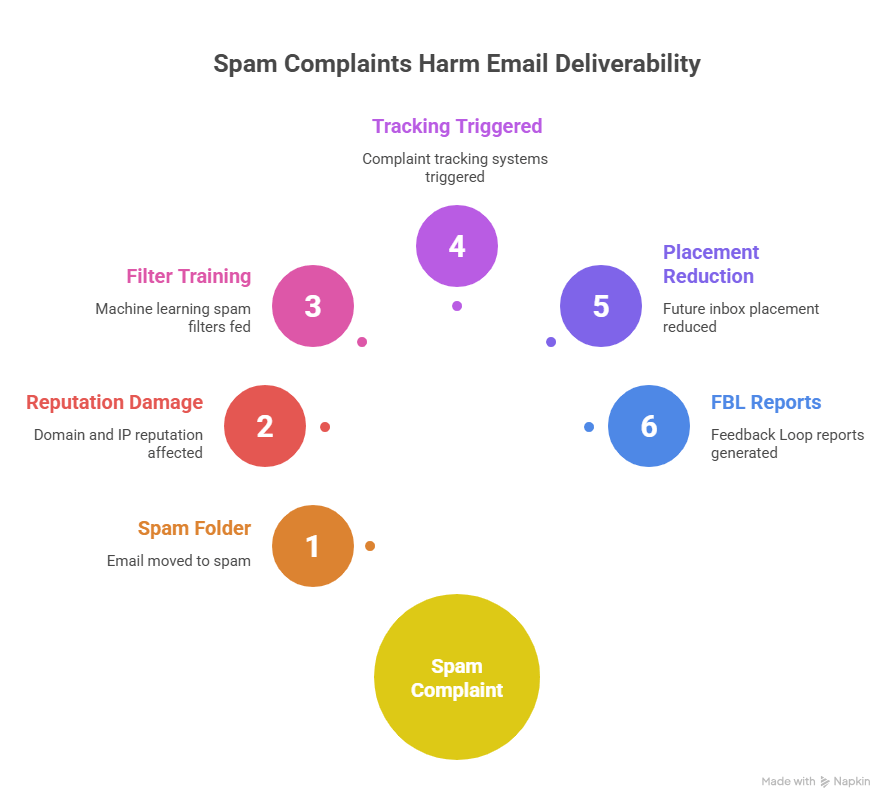
Depending on the provider, a spam complaint may:
- Move the email into the spam folder
- Affect domain and IP reputation
- Feed machine learning spam filters
- Trigger complaint tracking systems
- Reduce future inbox placement
- Generate Feedback Loop (FBL) reports for participating senders
Over time, repeated complaints make mailbox providers more likely to filter future campaigns into spam or Promotions instead of the primary inbox.
For bulk senders, even relatively small complaint spikes can become dangerous because providers evaluate complaint patterns at scale across domains, IP addresses, authentication records, and recipient engagement.
A sender consistently generating complaints may start seeing:
- Lower inbox placement
- More emails filtered into Spam
- Reduced open and click rates
- Temporary sending limits
- Domain or IP reputation damage
- Delivery throttling or outright blocking
Spam complaints ultimately become part of a much larger reputation system. Mailbox providers combine complaint activity with authentication, engagement, unsubscribe behavior, bounce rates, sending consistency, and recipient trust signals when deciding whether future emails belong in the inbox.
Effect of spam complaints
The golden rule: acceptable spam complaint rates
Spam complaint rates should stay as low as possible.
Google and Yahoo officially recommend bulk senders keep spam complaint rates below 0.1% and avoid reaching 0.3% or higher.
Healthy email programs often operate far below those thresholds. Industry benchmark reports frequently place average complaint rates closer to 0.01%.
Those thresholds are maximum limits, not targets to aim for..
For most senders, even relatively small complaint increases can create deliverability problems long before formal enforcement thresholds are reached.
How major inbox providers handle spam complaints
Different mailbox providers process spam complaints differently, which is one reason deliverability troubleshooting can become complicated for high-volume senders.
Gmail
Gmail primarily tracks complaints through Google Postmaster Tools. Large senders can also use Feedback-ID identifiers to measure complaint activity across specific campaigns, customer segments, or mail streams.
Yahoo
Yahoo provides Complaint Feedback Loops (CFLs) that allow participating senders to receive spam complaint reports in Abuse Reporting Format (ARF).
Microsoft Outlook
Microsoft exposes complaint and reputation data through services like JMRP (Junk Mail Reporting Program) and SNDS (Smart Network Data Services).
These systems help senders monitor complaint activity, IP reputation, and recipient trust signals tied to Outlook and Hotmail users.
Apple iCloud Mail
Apple takes a more privacy-focused approach and doesn’t publicly offer a traditional Feedback Loop system for senders.
Instead, senders often need to infer complaint-related problems through engagement changes, spam placement, bounce behavior, and overall deliverability trends.
Because complaint systems vary across providers, monitoring deliverability across multiple mailbox providers is extremely important for larger email programs.
6 ways to prevent spam complaints
Lowering spam complaints is mostly about building a better subscriber experience.
Recipients are far less likely to report emails as spam when they:
- Clearly remember signing up
- Receive relevant content
- Can unsubscribe easily
- Trust the sender
- Control email frequency
Here are some tips to help you stay well below the complaint threshold.
1. Set up Feedback Loops
FBLs allow mailbox providers to notify senders when recipients report emails as spam.
When configured properly, FBLs help businesses:
- Identify complainers quickly
- Remove problematic subscribers
- Monitor complaint spikes
- Detect deliverability problems earlier
FBL data becomes valuable for high-volume senders because it helps isolate:
- Problematic campaigns
- Risky acquisition sources
- Complaint-heavy segments
- Poor-performing email content
2. Implement a sunset policy for unengaged leads
Inactive subscribers are far more likely to complain about emails.
Over time, people forget signing up, lose interest, or stop recognizing the sender entirely. Continuing to email long-term inactive contacts usually increases complaint risk.
A sunset policy automatically reduces or stops sending to subscribers who stop engaging after a defined period, often between 90 and 180 days.
3. Make unsubscribing easier than reporting spam
If users can’t quickly find the unsubscribe option, many will choose the spam button instead.
Every marketing email should include:
- A visible unsubscribe link
- Clear sender branding
- Accurate “From” information
- Realistic subject lines
Some businesses intentionally hide unsubscribe links or make the process difficult in an attempt to decrease churn. That usually increases spam complaints instead.
4. Authenticate your domain (SPF, DKIM, and DMARC)
Email authentication helps mailbox providers verify that your emails are legitimate and authorized.
Deliverability heavily depends on properly configured:
- SPF
- DKIM
- DMARC
Without authentication, mailbox providers are more likely to distrust emails or filter them aggressively.
Authentication is also now a core requirement for many bulk senders under Google and Yahoo’s 2024 sender guidelines.
5. Don’t buy lists
Purchased email lists almost always create deliverability problems.
They often contain:
- Spam traps
- Disposable addresses
- Inactive users
- Outdated contacts
- Known complainers
More importantly, the people on purchased lists usually never explicitly asked to receive emails from the sender.
That dramatically increases the chances of spam complaints, low engagement, and sender reputation damage.
6. Keep your email list clean
Continuing to email disengaged contacts increases the chances of recipients reporting campaigns as spam instead of unsubscribing normally.
Regular list cleaning cuts:
- Complaint rates
- Bounce rates
- Spam trap risk
- Inactive subscribers
- Deliverability problems
For businesses sending large campaigns, list verification also helps identify disposable, invalid, and risky addresses before they damage sender reputation.
EmailListVerify allows you to verify up to 100 email addresses for free to improve list quality and decrease complaint-related deliverability issues.
[Verify 100 emails free]
Spam complaints are rarely caused by a single issue. They usually come from a combination of weak list hygiene, poor targeting, inconsistent engagement, and frustrating subscriber experiences.
Keeping complaint rates low requires ongoing monitoring, clean sending practices, and making it easy for recipients to leave before frustration turns into spam reports.
Conclusion
Spam complaints are one of the clearest warning signs that an email program has a trust, engagement, or list quality problem.
Strong list hygiene, proper authentication, easy unsubscribe options, and engagement management all play a major role in keeping complaint rates low.
For businesses that want additional protection, EmailListVerify finds identify risky, inactive, disposable, and complaint-prone email addresses before they damage deliverability. Combined with ongoing monitoring and healthy sending practices, that creates a much more stable long-term email program.
Join Our Monthly Newsletter
Learn how to improve email deliverability and clean your email lists with and more.