Quick links
TL;DR (Quick Answer)
Email list scrubbing removes invalid, inactive, risky, and low-quality email addresses from your database before they damage deliverability or inflate your email marketing costs.
A dirty email list quietly hurts open rates, increases bounce rates, raises spam complaints, and makes it harder to reach the inbox consistently. Regular list scrubbing helps protect sender reputation, improve engagement metrics, and reduce wasted ESP costs.
Most email lists slowly decay over time.
People abandon inboxes, change jobs, mistype addresses, stop engaging with emails, or sign up using temporary burner accounts they never plan to use again. If those contacts stay on the list too long, they quietly start damaging deliverability.
At the same time, many businesses continue paying their Email Service Provider (ESP) for thousands of subscribers who haven’t opened an email since 2023.
That creates two problems:
- You spend money storing inactive contacts
- Your engagement metrics gradually get worse
Mailbox providers pay close attention to engagement signals when deciding whether emails belong in the inbox, promotions tab, or spam folder. If large portions of your database never open, click, or interact with campaigns, it becomes harder to maintain strong deliverability over time.
That’s where email list scrubbing comes in handy.
A proper list cleanup removes invalid addresses, inactive subscribers, spam traps, and other risky contacts before they create bigger deliverability problems.
Key takeaways
- Email lists naturally decay over time as subscribers abandon inboxes, change jobs, or stop engaging with campaigns
- Bounce rates above 2% and spam complaints above 0.1% are strong warning signs that a list needs cleaning
- Scrubbing removes invalid, risky, and inactive contacts before they damage sender reputation
- Spam traps, hard bounces, disposable emails, and inactive subscribers are some of the biggest deliverability threats
- Re-engagement campaigns help identify subscribers who still want to hear from your brand before removing them
- Double opt-in, real-time verification, and automated sunset policies help keep lists clean long term
4 red flags that mean it’s time to scrub
Most email lists need cleaning sooner than businesses realize.
Even lists that were originally built through legitimate opt-ins slowly collect inactive subscribers, abandoned inboxes, typo-filled addresses, and risky contacts over time. The longer those issues sit untouched, the more they affect deliverability and campaign performance.
Here are some of the clearest warning signs that your list needs attention.
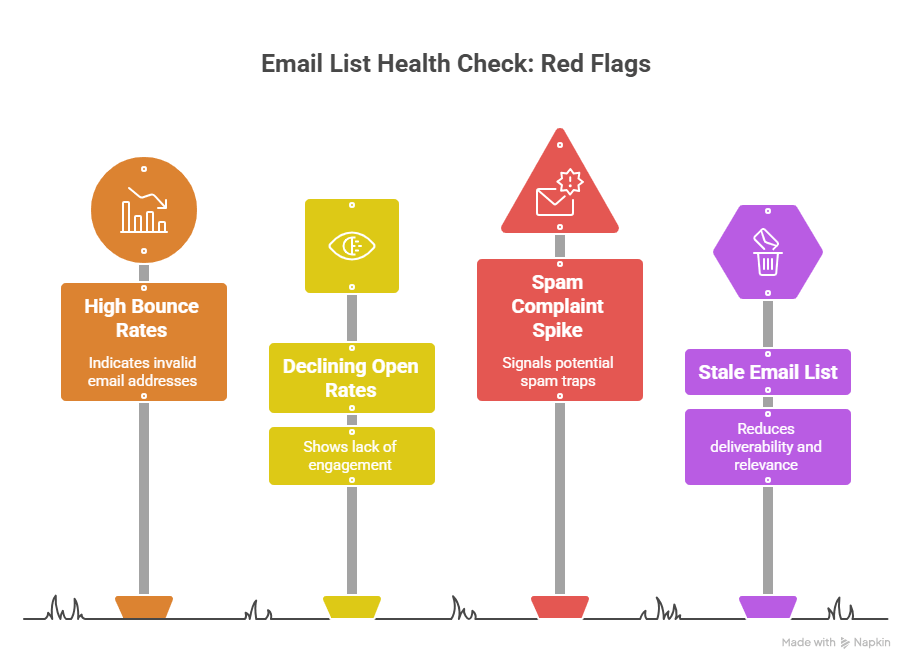
When it’s time to clean your email list
Bounce rates above 2%
High bounce rates usually mean too many invalid or abandoned email addresses remain in the database.
Mailbox providers treat excessive bounces as a sign of poor list hygiene, which can damage sender reputation and make inbox placement less reliable over time.
Open rates falling below industry averages
While benchmarks vary by industry, consistently low open rates often signal that large portions of the list are inactive or disengaged.
For many email programs, average open rates below roughly 15-20% are a sign that the database may contain too many inactive subscribers.
A spike in spam complaints
Spam complaints are one of the fastest ways to damage deliverability.
Most mailbox providers expect complaint rates to stay extremely low. Once complaint rates start climbing above roughly 0.1%, sender reputation problems can escalate quickly.
You haven’t cleaned the list in over 6 months
Email databases decay constantly.
Even healthy lists collect bad emails over time. Businesses that never clean their lists often see gradual declines in engagement and inbox placement without realizing the database itself is the problem.
The “toxic six”: what exactly are we scrubbing?
Not every bad email address creates the same type of risk.
Some hurt deliverability directly through bounces and spam complaints, while others weaken engagement metrics or distort campaign reporting over time.
The goal of list scrubbing is identifying and removing the contacts most likely to damage sender reputation, lower inbox placement, or waste sending volume.
These are the six most common problem categories and how they should usually be handled.
| Email type | Definition | Risk level | Action required |
| Hard bounces | Email addresses that no longer exist or cannot receive mail permanently. | Critical | Delete immediately |
| Spam traps | Honeypot addresses used by mailbox providers and anti-spam organizations to identify poor sending practices. | Critical | Delete immediately |
| Known complainers | Subscribers who frequently mark marketing emails as spam. | High | Remove or suppress immediately |
| Disposable emails | Temporary burner addresses created for short-term use or free downloads. | High | Delete or block |
| Catch-all domains | Domains configured to accept all incoming mail, making verification and engagement quality harder to measure. | Medium | Segment and monitor |
| Role-based emails | Generic inboxes like admin@, support@, or sales@ that are often shared by multiple people. | Low/Medium | Segment and monitor |
Step-by-step: how to scrub your email list
Effective list scrubbing is more than just deleting obvious invalid addresses.
The real goal is improving overall list quality by removing subscribers and email addresses most likely to hurt deliverability, damage engagement metrics, or waste sending volume.
A structured cleanup process also lowers the risk of accidentally removing valuable subscribers who still want to hear from your brand.
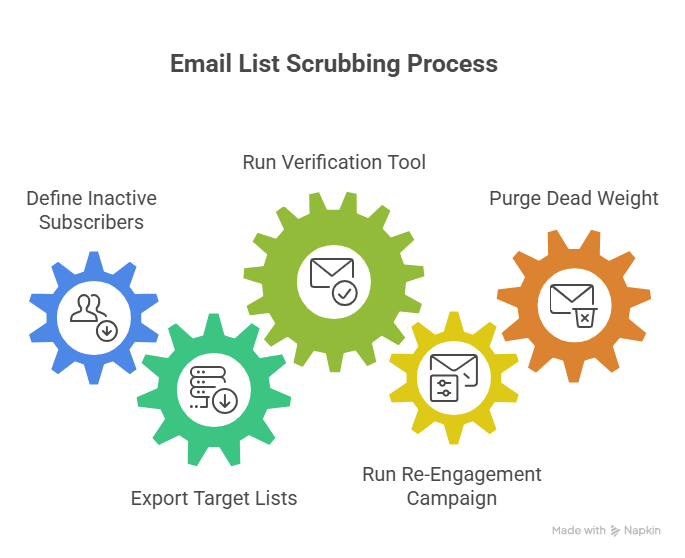
How to scrub your email list in 5 steps
Step 1: Define your inactive subscribers
Before cleaning anything, decide what “inactive” actually means for your business.
Inactive subscribers are usually people who haven’t done these actions in a specific time window:
- Opened an email
- Clicked a campaign
- Visited from an email
- Engaged with your brand
For many businesses, that window falls somewhere between 90 and 180 days depending on email frequency and sales cycle length.
For example:
- A daily newsletter may define inactivity after 60-90 days
- A B2B SaaS company sending monthly campaigns may wait 6 months or longer
The important thing is consistency. Without a clear inactivity definition, old disengaged contacts tend to stay in the database indefinitely.
Step 2: Export your target lists from Your ESP
Once you’ve identified inactive subscribers, export those segments from your ESP as a CSV file.
Most platforms make this relatively straightforward:
- Mailchimp allows exports through audience segments and engagement filters
- Klaviyo supports exports based on profile activity and campaign engagement
- ActiveCampaign lets businesses build inactivity segments using automation and tagging filters
At this stage, many businesses export:
- Inactive subscribers
- Older imported lists
- Contacts that haven’t opened or clicked recently
- Unengaged segments from specific campaigns or signup sources
Working with segmented exports is usually safer than cleaning the entire database at once. It lowers the risk of accidentally removing active subscribers who still engage occasionally.
Step 3: Run the CSV Through an Email Verification Tool
Once the list is exported, upload the CSV file into an email verification platform.
Tools like EmailListVerify, ZeroBounce, NeverBounce, and Kickbox scan the database for invalid, risky, and low-quality addresses before they create deliverability problems.
Behind the scenes, these tools perform multiple checks, including:
- Syntax validation
- Domain and DNS checks
- MX record verification
- SMTP server validation
- Disposable email detection
- Spam trap and risk analysis
The goal is identifying addresses most likely to bounce, complain, damage engagement metrics, or hurt sender reputation.
After processing finishes, the verification tool usually separates contacts into categories such as:
- Valid
- Invalid
- Catch-all
- Disposable
- Unknown
- Risky
That makes it much easier to decide which contacts should stay active, which should be monitored, and which should be removed entirely.
Want to get the ball rolling on your list scrubbing? Sign up with EmailListVerify and verify 100 emails for free.
[Verify 100 emails free]
Step 4: Run a re-engagement campaign (the “win-back”)
Before removing valid-but-unengaged contacts, many businesses run a final re-engagement campaign to identify subscribers who still want to stay on the list.
These campaigns are usually simple and direct:
- “Do you still want to hear from us?”
- “Click here to stay subscribed”
- “We’re cleaning our list. Stay subscribed if you still want updates.”
These campaigns focus on separating truly inactive subscribers from people who may still be interested but simply stopped engaging temporarily.
A typical win-back campaign may include:
- A short reminder of the value subscribers receive
- A clear CTA button
- A deadline before removal
- An option to update preferences or reduce email frequency
Subscribers who re-engage can remain active, while those who ignore the campaign entirely often become strong candidates for suppression or removal.
Step 5: Purge the dead weight
Once verification and re-engagement campaigns are complete, it’s time to remove the remaining low-quality contacts from the database.
This usually includes:
- Hard bounces
- Spam traps
- Disposable addresses
- Known complainers
- Invalid emails
- Subscribers who ignored the win-back campaign entirely
Most verification platforms provide a cleaned export file that makes this process easier.
Businesses can then:
- Delete risky contacts completely
- Suppress them from future campaigns
- Move uncertain categories into separate monitoring segments
A smaller healthy list almost always performs better than a massive inactive one filled with risky contacts.
How to keep your list clean on autopilot (preventative maintenance)
Scrubbing a list once helps, but preventing database decay in the first place is even more valuable.
The best email programs treat list hygiene as an ongoing process instead of a one-time cleanup project. Small preventative systems dramatically lower the chances of future deliverability problems.
Implement double opt-in
Double opt-in requires subscribers to confirm their email address before joining the list.
That extra confirmation step helps block:
- Fake signups
- Typo-filled addresses
- Spam bots
- Low-intent subscribers
While double opt-in can slow list growth slightly, it usually improves overall list quality and lowers bounce risk over time.
Use a real-time verification API
Real-time email verification checks addresses directly during signup before they ever enter the database.
This helps stop:
- Invalid emails
- Disposable addresses
- Syntax errors
- High-risk domains
…before they become future deliverability problems.
Many businesses connect verification APIs directly to:
- Signup forms
- Checkout flows
- CRM lead forms
- Webinar registrations
- Newsletter popups
That keeps bad data from accumulating in the first place.
Set up an automated sunset policy
Inactive subscribers should not stay active forever. A sunset policy automatically identifies and suppresses contacts who stop engaging for a specific period of time, often between 90 and 180 days.
For example, an ESP automation may:
- Tag subscribers after prolonged inactivity
- Send a re-engagement sequence
- Reduce sending frequency
- Automatically suppress inactive users after no response
This keeps engagement healthier long term and reduces the need for large manual cleanup
projects later.
Conclusion
Email list scrubbing is one of the fastest ways to improve deliverability, protect sender reputation, and stop wasting money on inactive subscribers.
A consistent cleanup process helps keep engagement healthier and inbox placement more stable long term.
More importantly, preventative systems like double opt-in, real-time verification, and automated sunset policies make future list maintenance much easier.
For businesses that want to automate list hygiene, EmailListVerify offers both bulk email verification and a real-time verification API that can block invalid, disposable, and risky email addresses before they ever enter the database.
Clean lists usually outperform large neglected ones. Better engagement, lower bounce rates, fewer spam complaints, and more reliable deliverability almost always matter more than raw subscriber count.
Join Our Monthly Newsletter
Learn how to improve email deliverability and clean your email lists with and more.


