Quick links
TL;DR (Quick Answer)
Email verification checks whether an address is real and can receive messages before you send. It reduces bounce rates, protects your sender reputation, and improves campaign performance. The best approach is to use real-time checks at signup and regularly clean your email lists.
Email lists don’t stay clean for long. On average, email data decays by around 22-30% per year as people change jobs, abandon inboxes, or enter incorrect information.
That creates a real problem. Sending emails to invalid or non-existent addresses leads to hard bounces, damages your sender reputation, and pushes your campaigns toward the spam folder. It also means you’re paying to send emails that will never be opened.
Email verification solves this by checking whether an address actually exists and can receive messages before you hit send.
In this guide, we’ll walk through how it works, why it matters, and how to use it to keep your lists clean and your campaigns performing.
Key takeaways
- Email verification confirms whether an address is functional, not just whether it looks valid.
- Email lists decay by around 20–30% per year, making regular cleaning necessary.
- Sending to invalid addresses increases bounce rates and can harm your sender reputation.
- Verification tools use multiple checks, including DNS lookups and server-level validation.
- Real-time verification helps prevent bad data at signup, while bulk cleaning maintains list quality over time.
- Not all results are absolute, especially with catch-all domains, so some risk remains.
- Using a reliable tool like EmailListVerify can help streamline both real-time and bulk verification.
What is email verification?
Email verification checks whether an email address is real, active, and able to receive messages.
It goes beyond simple formatting checks. Instead of just confirming that an address looks valid, verification tools run a series of checks in the background to determine whether the mailbox actually exists and is reachable.
The email verification process typically includes validating the domain, checking mail server records, and communicating with the server to confirm that the specific inbox can accept email, all without sending a message.
Email verification vs. email validation
These terms get mixed up a lot, but they refer to different things.
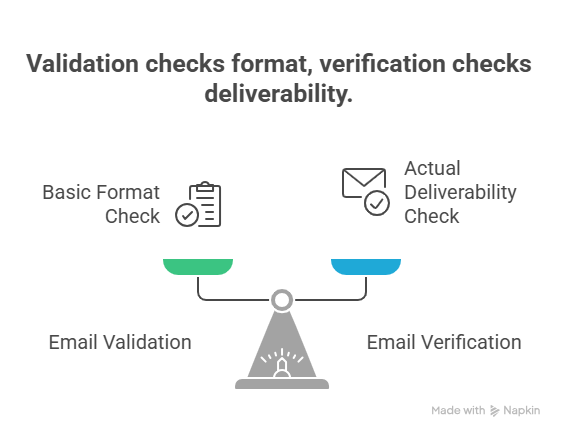
Email validation is a basic check. It looks at the format of an address to see if it follows the right structure, like having an “@” and a valid domain.
Email verification goes further. It checks whether the address actually able to receive messages by looking at the domain and communicating with the mail server.
Put simply, validation checks if an email looks correct, and verification checks if it works.
How does the email verification process work?
Email verification results are not always absolute, but combining these checks gives a strong indication of whether an email is valid and reachable.
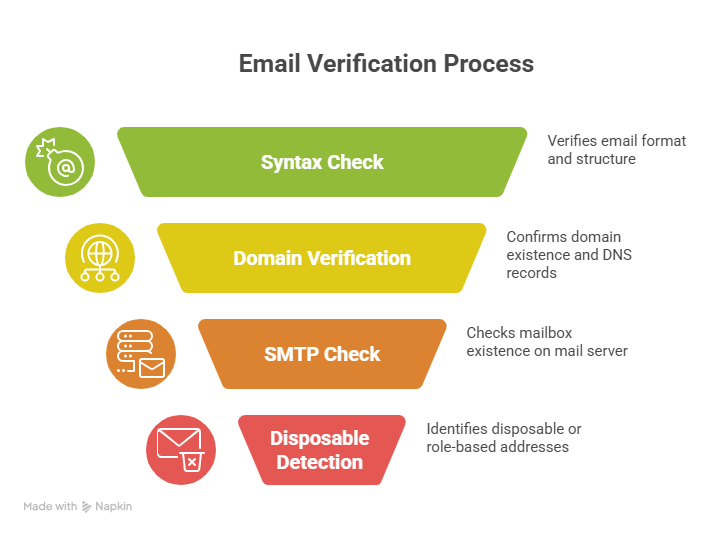
Most tools follow a similar process, starting with basic formatting and moving into deeper checks at the domain and server level.
1. Syntax check
The tool checks whether the email address is formatted correctly, including the structure, “@” symbol, and domain. It catches obvious issues such as missing characters, invalid domains, or incorrect formatting.
2. Domain and DNS verification
The domain is checked to confirm that it exists and is properly configured to receive email. This includes verifying DNS records and confirming that valid mail exchange (MX) records are present.
3. SMTP check
The verification tool connects to the mail server to confirm that the specific mailbox exists and can receive messages, without actually sending an email. Some domains are configured to accept all incoming messages regardless of the mailbox, which makes these addresses harder to fully verify.
4. Disposable and spam trap detection
The address is checked against known disposable email services, role-based inboxes such as support@ or info@, and spam traps that can negatively impact sender reputation.
Each step filters out a different type of bad or risky address.
Why you must verify your email lists
Email verification directly impacts whether your emails reach the inbox, how your campaigns perform, and how much you spend on sending.
Without regular verification, even a strong email strategy can fall apart over time as your data becomes outdated or unreliable.
Protect sender reputation and deliverability
Invalid email addresses lead to hard bounces, which damage your sender reputation and increase the chances of your emails landing in spam. Even a small number of bad addresses can have an impact.
Major providers like Google and Yahoo now expect senders to keep spam complaint rates below 0.3% and maintain proper authentication, making list quality more important than ever.
Maximize campaign ROI and accuracy
Outdated or invalid email addresses distort your campaign results. Opens, clicks, and conversions appear lower than they actually are, making it harder to understand what is working.
Removing inactive or non-existent contacts gives you a clearer view of performance and helps you make better decisions based on accurate data.
Reduce sending costs
Most email platforms charge based on the number of contacts or emails sent. Sending to invalid or low-quality addresses means you’re paying for messages that will never be delivered or opened.
Over time, this wasted spend adds up, especially for larger lists or high-volume campaigns.
How to implement email verification
Email verification can be added at different stages of your workflow. The best approach usually combines real-time checks at the point of entry with regular cleaning of your existing lists.
Real-time verification
Real-time verification runs when a user enters their email, typically in signup forms, checkout flows, or demo requests. If the address looks invalid or risky, the user can be prompted to correct it immediately.
This method prevents bad data from entering your system in the first place and keeps your lists cleaner over time.
Bulk list verification
Bulk verification is used to clean existing email lists. You upload a file, usually a CSV, to a verification tool, which scans the entire list and flags invalid, risky, or inactive addresses.
It’s useful if you’re working with an older list, imported contacts, or getting ready to send a large campaign.
Manual methods
Developers can run basic checks using tools like PHP’s FILTER_VALIDATE_EMAIL or by connecting to mail servers through command-line tools.
These methods can confirm formatting or basic server responses, but they lack the depth and accuracy of dedicated verification services.
Understanding email verification results
After running your list through a verification tool, each email address will be assigned a status. These labels help you decide which contacts are safe to email, which ones carry risk, and which should be removed entirely.
Valid (safe to send)
These email addresses are confirmed to exist and can receive messages. They are considered safe for sending and should make up the core of your list.
Risky (proceed with caution)
These addresses may still accept email, but come with uncertainty or lower engagement potential.
- Catch-all domains: The server accepts all incoming messages, even if the specific mailbox does not exist, which makes these difficult to fully verify.
- Role-based addresses: Emails like support@ or info@ are often shared inboxes and tend to have lower engagement.
- Full mailboxes: The inbox exists, but cannot currently receive new messages.
Invalid (do not send)
These addresses should be removed from your list. They include emails with formatting errors, non-existent mailboxes, disposable addresses, or domains that cannot receive email. Sending to them will result in hard bounces and can hurt your sender reputation.
Email verification best practices
Keeping your email list clean is not a one-time task. It requires a mix of prevention and ongoing maintenance to protect deliverability and keep your data reliable.
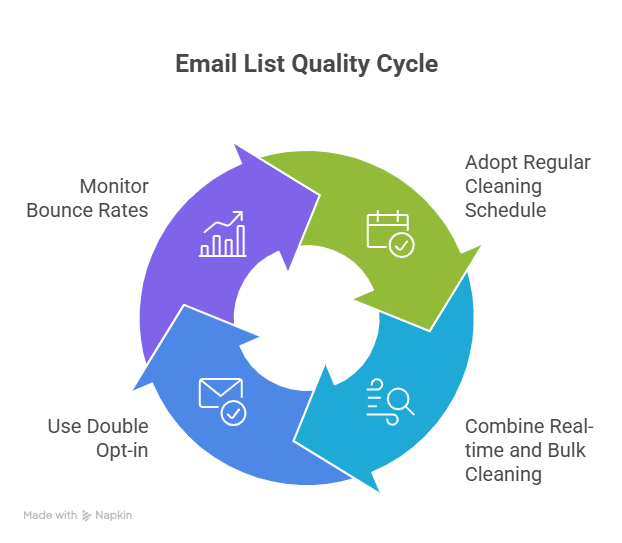
Adopt a regular cleaning schedule
It’s important to verify your lists on a consistent basis to prevent decay. For most teams, running a check every quarter or twice a year is enough to keep things under control.
Combine real-time verification with bulk cleaning
Use real-time verification at signup or checkout to catch bad data immediately, and run bulk verification on your existing lists to remove anything that slipped through.
Use double opt-in
Send a confirmation email with an activation link to make sure the user actually has access to the inbox they signed up with. This adds an extra layer of protection against fake or mistyped addresses.
Monitor bounce rates closely
Keep an eye on your bounce rates after each campaign. A sudden spike is usually a sign that your list quality is slipping and needs attention.
Choosing the right email verification tool
Not all email verification tools offer the same level of accuracy, speed, or flexibility. The right choice depends on how you plan to use it and how critical email deliverability is to your business.
When evaluating tools, look for a few key features:
- Accuracy and detection coverage: The tool should identify invalid emails, catch-all domains, disposable addresses, and spam traps.
- Speed and scalability: Especially important for bulk verification or large databases.
- API access: Useful for real-time verification in signup forms or checkout flows.
- Data security and compliance: Make sure the tool follows GDPR and handles data securely.
- Transparent pricing: Costs should scale predictably based on usage.
Several tools on the market offer email verification, including options like ZeroBounce, NeverBounce, Hunter, and MailerSend. While these tools vary in features and pricing, most follow a similar core verification process.
For teams that want a straightforward, reliable solution, EmailListVerify stands out for its balance of accuracy, speed, and ease of use. It supports both bulk verification and real-time checks, making it suitable for ongoing list maintenance as well as campaign preparation.
Conclusion
Email verification is one of the simplest ways to protect your sender reputation, improve deliverability, and get more accurate results from your campaigns.
Without it, even well-crafted emails can miss the inbox, waste budget, and skew your performance data.
Use real-time checks at signup and clean your list regularly to keep your data accurate and your campaigns on track.
If you have not reviewed your list quality recently, now is a good time to start. Running a quick verification can help you remove invalid addresses, reduce risk, and get more value from every email you send.
Frequently Asked Questions
Can email verification guarantee 100% deliverability?
No, email verification helps remove invalid addresses and reduce hard bounces, but deliverability also depends on factors like sender reputation, email content, and recipient server filters.
Is email verification GDPR compliant?
Yes, as long as the tool processes data securely. Keeping accurate and up-to-date contact data is part of GDPR best practices, especially when it comes to data quality and minimization.
What is the difference between email validation and verification?
Validation checks whether an email address is formatted correctly. Verification goes further and checks whether the address actually exists and can receive messages.
How often should I verify my email list?
It depends on how quickly your list grows, but a good rule is to verify it every few months. For active lists, quarterly or bi-annual cleaning is usually enough.
What happens if I send emails to invalid addresses?
You will see higher bounce rates, which can damage your sender reputation and increase the chances of your emails being filtered into spam.
Join Our Monthly Newsletter
Learn how to improve email deliverability and clean your email lists with and more.


